

Comparison


ByDesign vs Amazing Marvin
Marvin hands you 100+ features to build a system. ByDesign builds the plan.
Amazing Marvin is a personal productivity toolbox: day planning, time blocking, habits, goals, Pomodoro and time tracking, each a feature you switch on and configure. ByDesign starts from the goal. Say what you want to achieve and the AI builds the tasks, schedules them around your hours and shows you before anything saves, on a canvas that runs from the year down to the day, with sharing and chat built in.
What you get with ByDesign that Amazing Marvin doesn’t offer
AI that starts from the goal
Say a goal and get tasks, subtasks, courses and deadlines on your calendar, with a goal page that tracks progress. Marvin’s goals are set up by hand in a six-step setup, and its AI is a mobile brain dump that sorts what you type or say into tasks.
Scheduling that does itself
ByDesign places tasks around your working hours, breaks and buffers, previews the result and waits for your OK. Marvin’s FAQ says a feature that builds your day’s schedule is “not yet” there: due tasks drop into your day, and time blocks are dragged by hand.
Your whole year on one canvas
Year, quarter, month, week and day on one zoomable surface, with sticky notes, images and pinned pages. Marvin’s Project Planner plans weeks, months and quarters, and its calendar shows a day, a week or a month.
Built for more than one person
Share pages with view, comment or edit access, assign tasks, chat in the app and add seats on a team plan, in 12 languages. Marvin shares task lists by link, sells one personal plan, and is English only.
ByDesign vs Amazing Marvin, feature by feature
Only the differences. What both apps do the same is listed underneath.
- Included
- Limited
- Not available
AI planning
AI goal plans
ByDesign
Included: Built and scheduledTasks, subtasks, courses and deadlines land on your calendar; AI and AI Plus plansAmazing Marvin
Not available: Goals set up by handSix-step setup with trackers; you link projects, tasks and habits yourselfAI scheduling with a preview you approve
ByDesign
Included: Preview, then acceptConflicts shown; nothing saves until you say so; AI and AI Plus plansAmazing Marvin
Not available: “Not yet”, per Marvin’s FAQDue tasks drop into your day; time blocks are dragged by handAuto-schedule around your hours
ByDesign
Included: Rules you setWork hours, breaks, buffers, max hours a day, split long tasksAmazing Marvin
Limited: Capacity barsSet hours per day or category and the Project Planner warns at 80% full; a feature that builds your schedule is “planned”, per the FAQPlanning assistant chat
ByDesign
Included: In the app, full contextSees your calendar, goals, habits and notes; moves and reschedules items; AI and AI Plus plansAmazing Marvin
Limited: AI brain dump on mobileSorts a typed or spoken dump into tasks for you to review; nothing to talk to about your planVoice control
ByDesign
Included: Mic and hands-freeOptional wake phrase; AI and AI Plus plansAmazing Marvin
Limited: Voice input on mobileDictate tasks and brain dumps, plus Siri; “available now in the mobile apps”, per the roadmapNatural-language quick add
ByDesign
Included: Type it like you’d say it“Meeting tomorrow at 10AM” becomes a scheduled itemAmazing Marvin
Limited: Symbol shortcuts“Call insurance @quick due 5d #Household”; a “symbol/quick word language”, per Marvin’s FAQ
Planning views
Year-to-day planning canvas
ByDesign
Included: Year to dayYear, quarter, month, week and day on one zoomable surface; AI and AI Plus plansAmazing Marvin
Limited: Week, month and quarterProject Planner with capacity bars; the calendar shows day, week and month; no year view in eitherSticky notes, images and pinned pages on the calendar
ByDesign
Included: YesAmazing Marvin
Limited: Day NotesOne note per day, plus files attached to tasks; nothing pinned onto the calendar itself
Learning and languages
Courses and roadmaps from the Hub
ByDesign
Included: The HubCourses, roadmaps and a habit library; schedule a roadmap straight onto your calendarAmazing Marvin
Not available: Workshops, both “coming soon”Two productivity courses on Marvin’s site; in the app, a Workflow Library of setup templatesLanguages
ByDesign
Included: 12 languagesThe assistant answers in your languageAmazing Marvin
Not available: English only“Only available in English at the moment”, per Marvin’s FAQ
Integrations and collaboration
MCP for Claude, ChatGPT and other assistants
ByDesign
Included: YesClaude Desktop, Claude Code and ChatGPT guidesAmazing Marvin
Not available: API, webhooks, Zapier and a CLIZapier can only create tasks in Marvin, per its guideShare pages and assign tasks
ByDesign
Included: View, comment or editAssign tasks; @mention in commentsAmazing Marvin
Limited: Shared task listsShare a list by link or invitation; by default others can view, comment and complete itemsBuilt-in chat
ByDesign
Included: Direct and groupThreads, reactions, pollsAmazing Marvin
Not available: Comments on shared tasks insteadTeam plans
ByDesign
Included: Per seatAdd or remove members in settingsAmazing Marvin
Not available: One personal plan“One plan. Everything included”, per the pricing page; no team pricing
Amazing Marvin column based on help centre, auto-scheduling FAQ, calendar, capacity planning, goals, habits, task sharing, languages FAQ, voice input, roadmap, courses and pricing on October 26, 2026. If something has changed, email info@bydesign.io.
Both apps cover the basics
- Day planning with duration estimates
- Time blocking on a built-in calendar
- Two-way Google and Apple calendar sync
- Tasks with subtasks, priorities, durations, deadlines and labels
- Recurring tasks
- Goals with progress tracking
- Habit tracker with streaks and stats
- Notes on tasks and projects
- Kanban boards
- Pomodoro timer
- Time tracking on tasks
- Customisable dashboard or screens
- Dark mode
- Home-screen widgets
- Web, Mac, Windows, iOS and Android apps
- Keyboard shortcuts
Why people switch from Amazing Marvin to ByDesign
Say the goal. Get a scheduled plan.
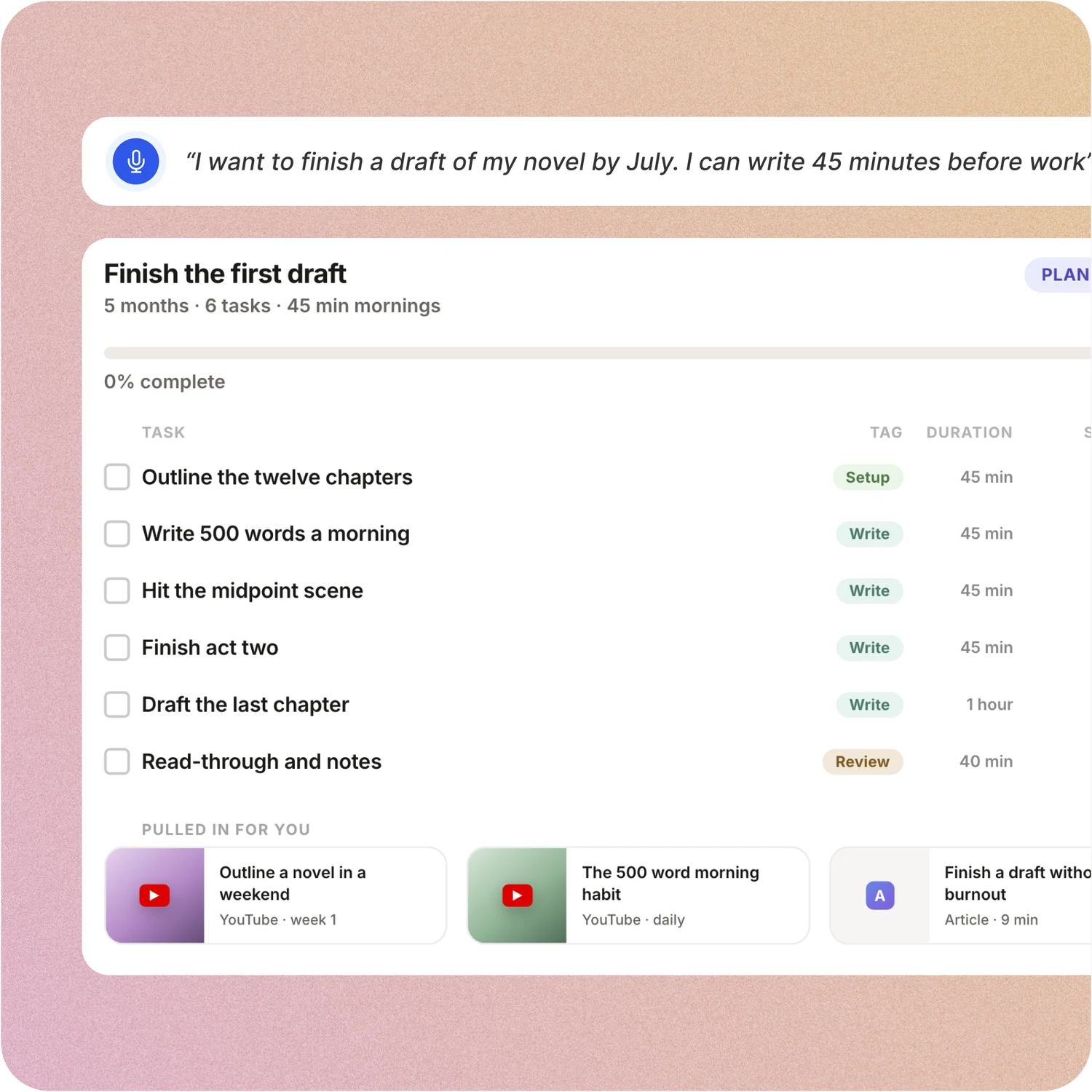
Tell ByDesign what you want to achieve. It asks a few questions, then builds the tasks, subtasks, courses and deadlines and schedules them around the life you already have. Replan in one message.
Amazing Marvin: In Marvin you create the goal, walk through its six-step setup, add trackers, then link the projects, tasks and habits yourself. The plan itself is yours to write.
A schedule you approve, not one you drag
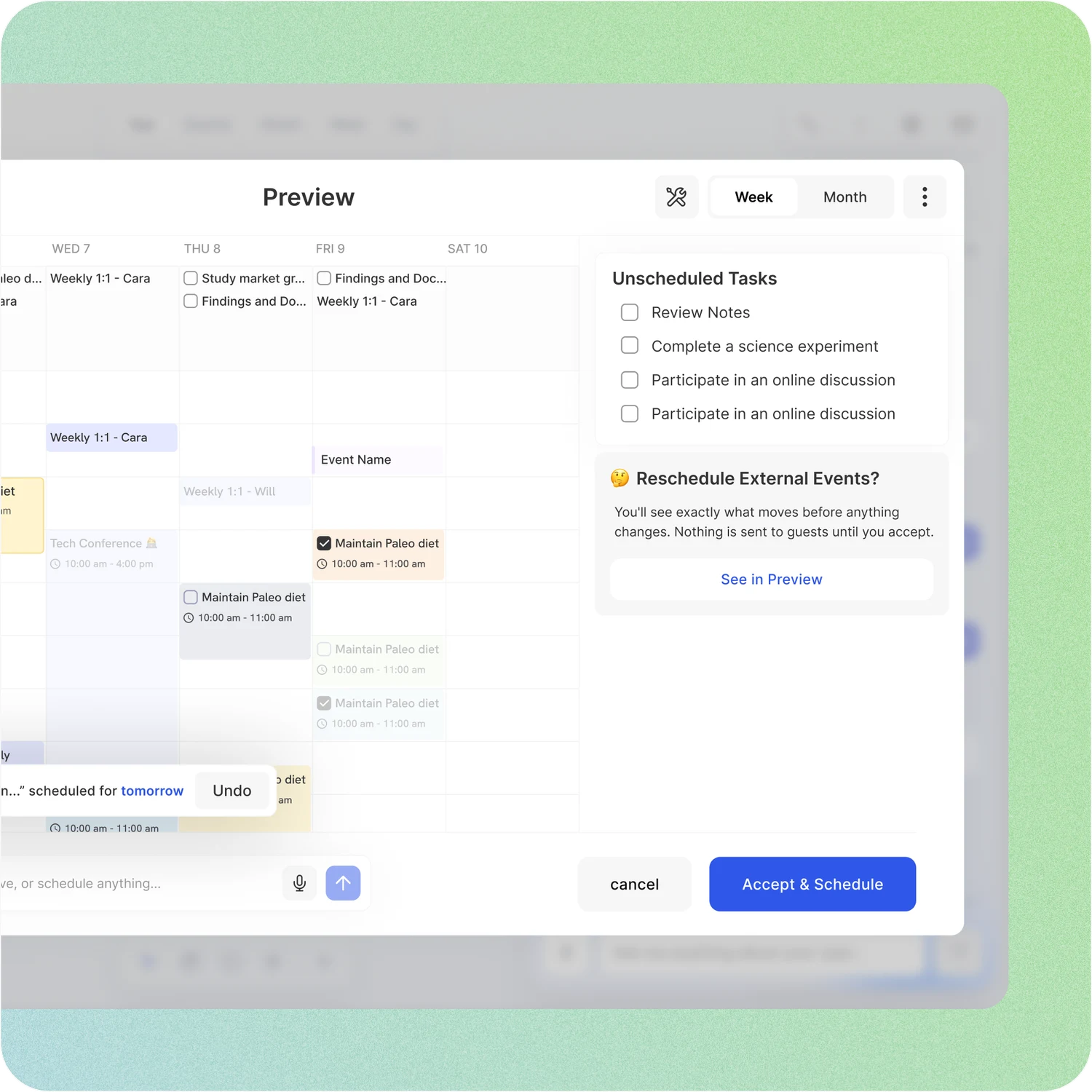
Set your hours, breaks and buffers once. ByDesign places tasks into the gaps, splits long ones, shows the proposed week and waits for your OK. Replan after a busy day in one message.
Amazing Marvin: Marvin’s FAQ says a feature that builds your day’s schedule is “not yet” there. Due and recurring tasks drop into your day on their own and unfinished ones roll over; everything else you drag in from the Master List or schedule yourself.
Your whole year on one surface
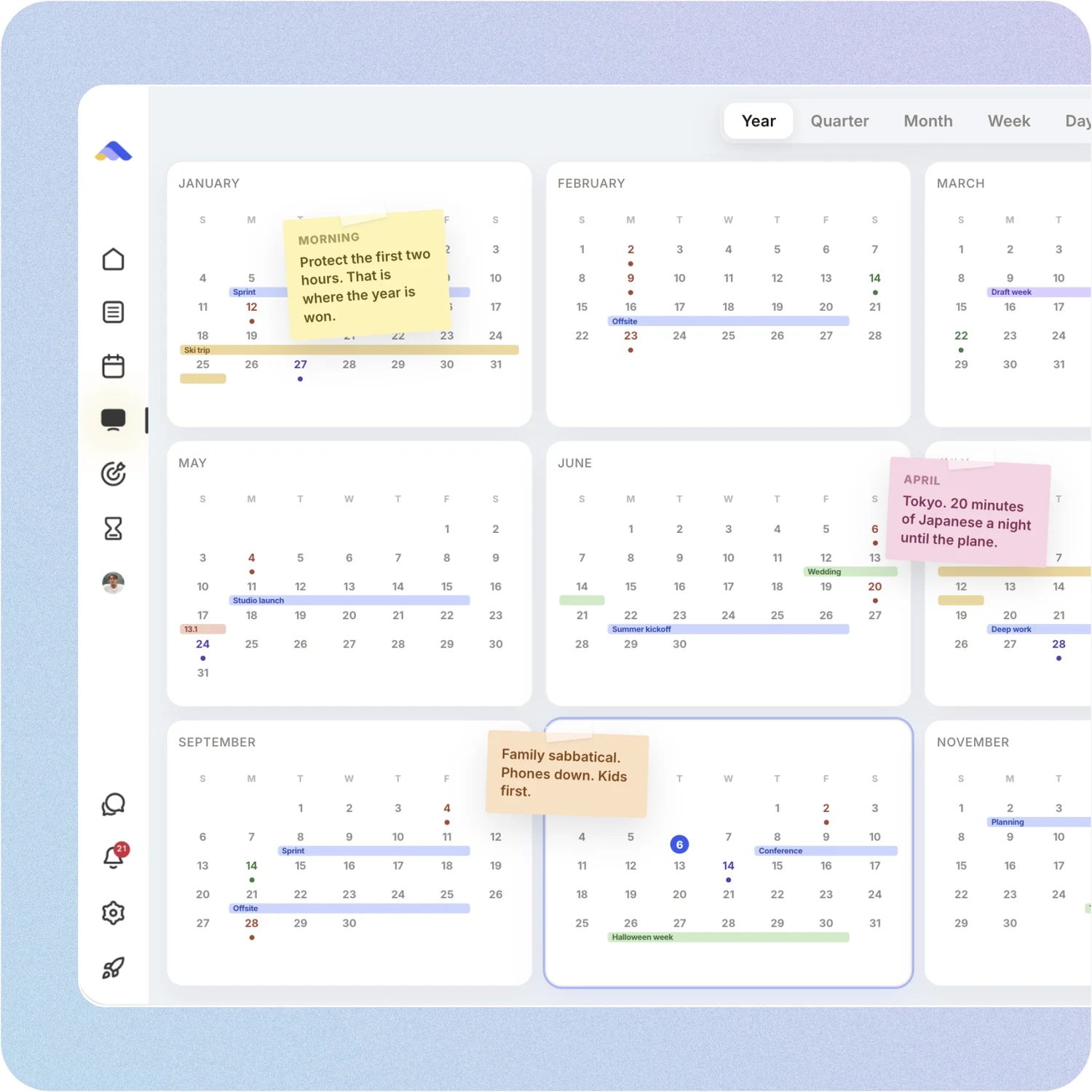
The planning canvas zooms from the full year down to a single day. Pin goals, notes and milestones where they belong, drag anything, and the plan keeps up.
Amazing Marvin: Marvin plans ahead in the Project Planner by week, month and quarter, with capacity bars so you don’t overfill. The calendar shows a day, a week or a month. There is no year view.
A workspace your team can live in
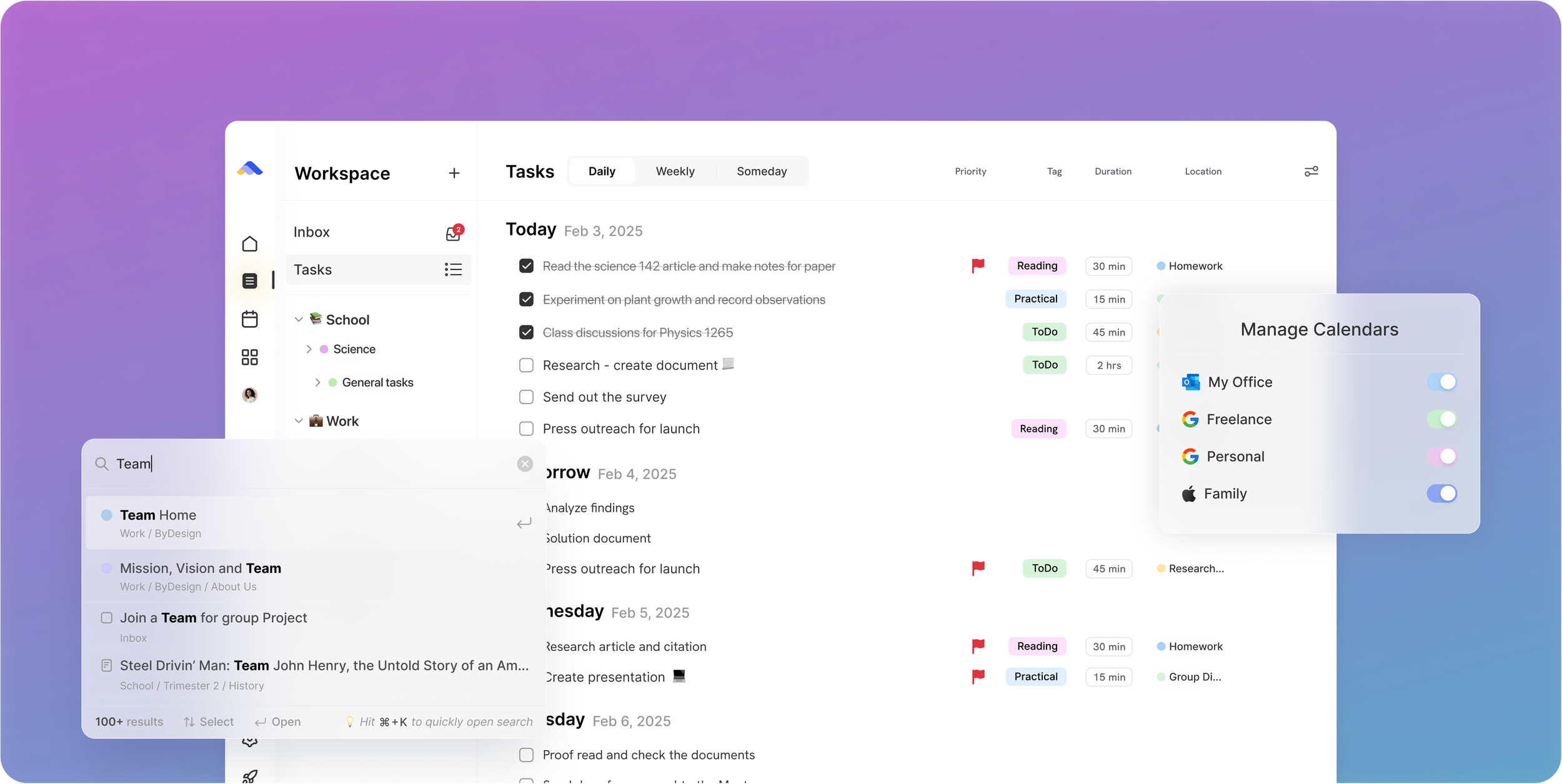
Share pages with view, comment or edit access, assign tasks, @mention people in comments and chat without leaving the app. Add seats from the app on a team plan.
Amazing Marvin: Marvin shares a list of tasks by link or invitation; people can view it, comment and complete items. There is no chat, no team plan, and the app is English only.
Don’t take our word for it.
From Daniel
Honestly, Notion was really exhausting for me... Your product works in the simplest way. I’m a product designer, and I’d love to share my feedback with you after using it more :)
From Narovsky
Hello! Just found byDesign less than 8 hours ago, and I’m blown away. It has the best of Workflowy (10 yr customer now), Notion, Google Calendar and ICQ (haha)! Oh and a neat Facebook too -- minus the obscure relatives and friends that rant-post too often. Anyhoo, just wanted to say you guys are working on a winner here
From Callio
Can I just say I love you. Finally, a good-looking app that isn’t complex as hell. There are tears in my eyes. I’ll happily pay for this!💯
Make the switch in three steps
No setup project. Start free, connect the calendar you already use, and give ByDesign your first goal.
- Start your free trial. No credit card.
- Connect your Google, Apple or Outlook calendar.
- Say your first goal and watch the plan land on your calendar.
Ready to stop building the system and start running the plan?
Start free. No credit card. Tell ByDesign a goal and watch the plan land on your calendar.
Try ByDesign free