

Comparison

 Habitica
ByDesign vs Habitica
Habitica turns your tasks into a game. ByDesign turns your goals into a plan.
Habitica rewards you with gold, experience and gear for checking off Habits, Dailies and To Do’s, and keeps you accountable with Parties, Quests and Challenges. ByDesign keeps the habit tracker and adds the rest: goals the AI turns into scheduled tasks, a calendar that syncs both ways, notes, a Pomodoro timer, a year-to-day canvas, and a team you can share with.
What you get with ByDesign that Habitica doesn’t offer
A plan built from the goal
Say a goal and ByDesign writes the tasks, subtasks, courses and deadlines, then schedules them with a preview you approve. Habitica’s tasks are Habits, Dailies and To Do’s you write yourself, with Challenges for curated task lists from the community.
A real calendar
Two-way sync with Google and Apple Calendar, auto-scheduling around your hours, and time blocking. Habitica has due dates on To Do’s and repeat schedules on Dailies; it doesn’t connect to a calendar or plan your day.
Notes, focus and the long view
Nested pages, a Pomodoro timer, time tracking on any task and a canvas from the year down to the day. Habitica keeps a notes field on each task and checklists on Dailies and To Do’s, and shows your avatar, stats and inventory.
Work together without a Group Plan
Share pages, assign tasks, @mention in comments and chat in the app on a per-seat team plan. Habitica’s shared task board, assignments and approvals come with Group Plans; everyday Parties share Quests, Challenges and chat.
ByDesign vs Habitica, feature by feature
Only the differences. What both apps do the same is listed underneath.
- Included
- Limited
- Not available
AI planning
AI goal plans
ByDesign
Included: Built and scheduledTasks, subtasks, courses and deadlines land on your calendar; AI and AI Plus plansHabitica
Not available: Challenges insteadCurated task lists made by the community; you write your own Habits, Dailies and To Do’sAI scheduling with a preview you approve
ByDesign
Included: Preview, then acceptConflicts shown; nothing saves until you say so; AI and AI Plus plansHabitica
Not available: NoAuto-schedule around your hours
ByDesign
Included: Rules you setWork hours, breaks, buffers, max hours a day, split long tasksHabitica
Not available: NoPlanning assistant chat
ByDesign
Included: In the app, full contextSees your calendar, goals, habits and notes; moves and reschedules items; AI and AI Plus plansHabitica
Not available: NoVoice control
ByDesign
Included: Mic and hands-freeOptional wake phrase; AI and AI Plus plansHabitica
Not available: No
Calendar and views
Two-way calendar sync
ByDesign
Included: Google and AppleEdit events in either place; Outlook and ICS subscriptions tooHabitica
Not available: Due dates and repeat schedulesOn To Do’s and Dailies; no calendarYear-to-day planning canvas
ByDesign
Included: Year to dayYear, quarter, month, week and day on one zoomable surface; AI and AI Plus plansHabitica
Not available: Task columnsHabits, Dailies, To Do’s and Rewards side by sideKanban boards
ByDesign
Included: Custom columnsMain board plus boards per pageHabitica
Not available: NoSticky notes, images and pinned pages on the calendar
ByDesign
Included: YesHabitica
Not available: NoCustomisable dashboard
ByDesign
Included: Drag-and-drop widgetsScore board, tasks, habits, inbox, pinned pages, KanbanHabitica
Limited: Avatar, stats and inventoryHealth, experience, gold and gear; no in-app dashboard
Notes, goals and focus
Notes and pages
ByDesign
Included: Nested pagesTables, code, embeds, sub-pages, backlinks; publish to the webHabitica
Limited: Notes field on tasksGoals with progress
ByDesign
Included: Goal pagesTasks, resources, percent complete, shareableHabitica
Not available: Levels and streaks insteadProgress shows as experience, levels and Daily streaks; it “does not have a visual representation of your task data over time”, per its FAQCourses and roadmaps from the Hub
ByDesign
Included: The HubCourses, roadmaps and a habit library; schedule a roadmap straight onto your calendarHabitica
Limited: ChallengesCommunity task lists, some with a Gem prize for the winnerPomodoro timer
ByDesign
Included: Built in25/5/15 cycles with a floating timerHabitica
Not available: NoTime tracking on tasks
ByDesign
Included: Start and pause on any taskTotals per task; “most tracked” filterHabitica
Not available: No
Collaboration and platforms
MCP for Claude, ChatGPT and other assistants
ByDesign
Included: YesClaude Desktop, Claude Code and ChatGPT guidesHabitica
Not available: Public API and webhooks insteadShare pages and assign tasks
ByDesign
Included: View, comment or editAssign tasks; @mention in commentsHabitica
Limited: Group PlansA shared task board with assignments and approvals, on a paid Group PlanBuilt-in chat
ByDesign
Included: Direct and groupThreads, reactions, pollsHabitica
Limited: Party and group chatChat with your Party; Group Plans add a dedicated chat spaceTeam plans
ByDesign
Included: Per seatAdd or remove members in settingsHabitica
Limited: Group PlansMembers get subscriber perks and a shared task boardApps
ByDesign
Included: Web, Mac, Windows, iOS, iPad and AndroidHabitica
Limited: Web, iOS and AndroidNo desktop apps
Habitica column based on features, plans, FAQ, UI text (open source), API guidelines, release notes and App Store listing on October 26, 2026. If something has changed, email info@bydesign.io.
Both apps cover the basics
- Habit tracker with streaks
- To Do’s with due dates, checklists and tags
- Repeat schedules
- Pause days (Habitica’s Pause Damage)
- Rewards for finishing tasks
- Reminders
- Dark mode
- Web, iOS and Android apps
Why people switch from Habitica to ByDesign
Say the goal. Get a scheduled plan.
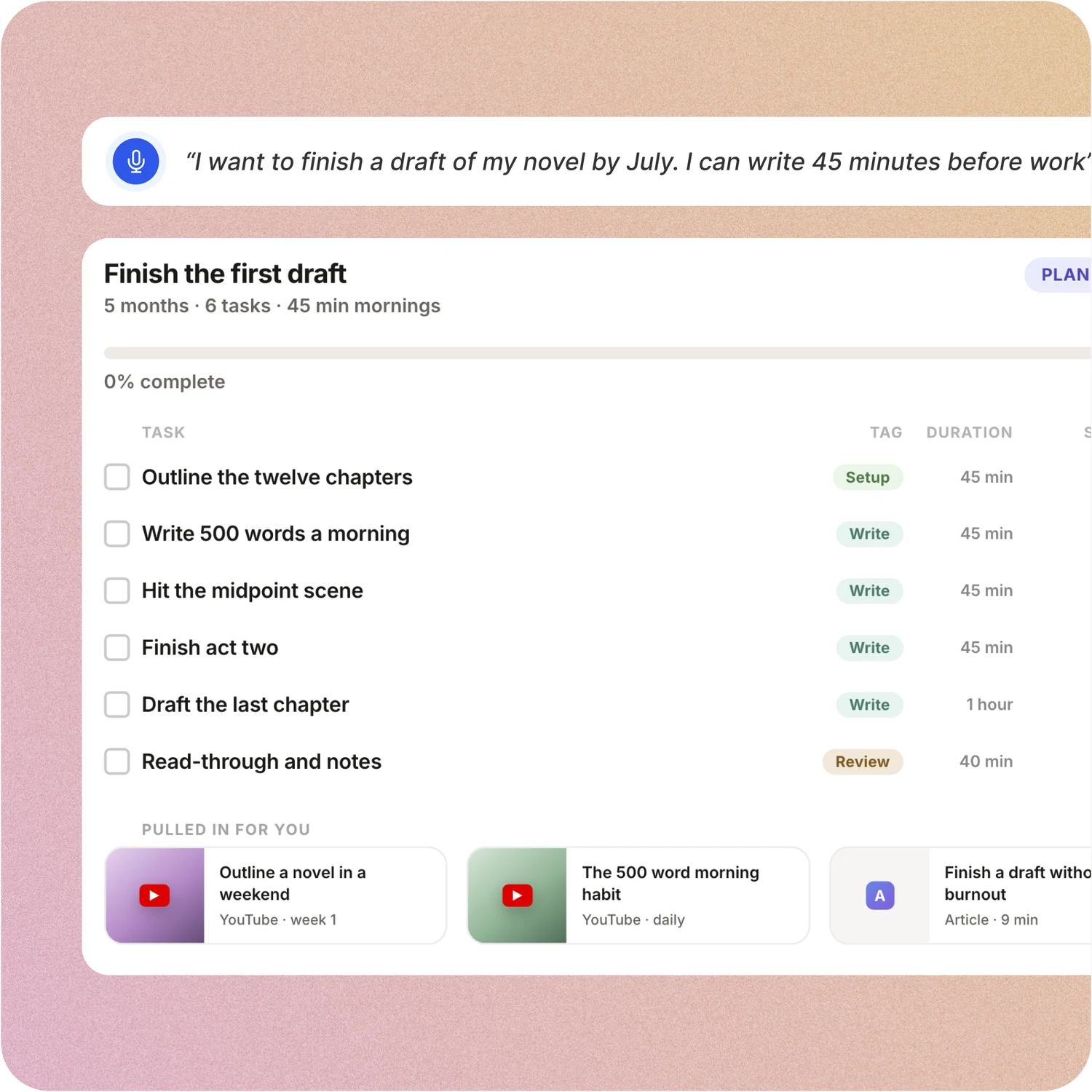
Tell ByDesign what you want to achieve. It asks a few questions, then builds the tasks, subtasks, courses and deadlines and schedules them around the life you already have. Replan in one message.
Habitica: In Habitica you write each Habit, Daily and To Do, set its difficulty and schedule, and earn rewards for checking it off. Nothing is generated from a goal, and nothing lands on a calendar.
Your calendar, both ways
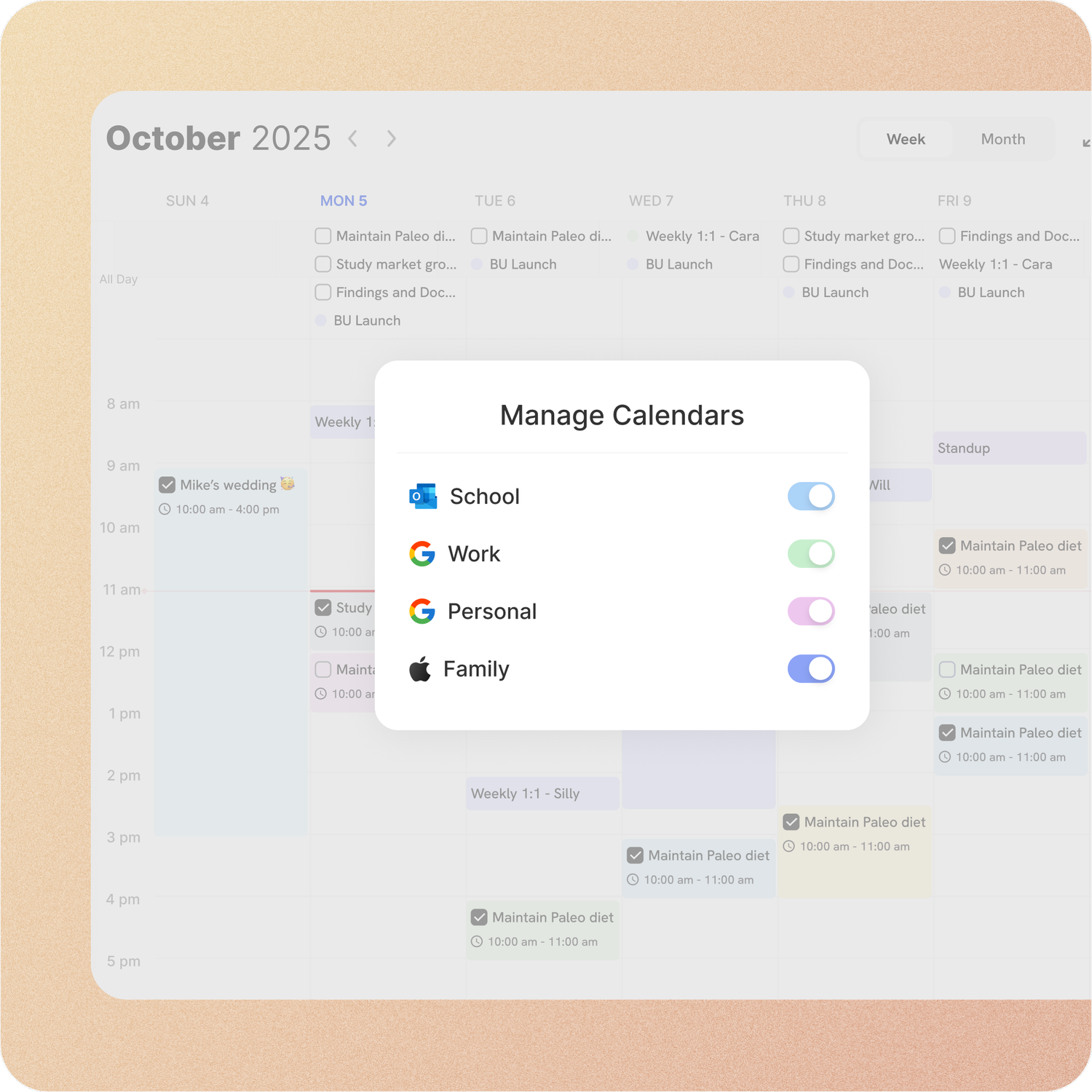
Connect Google or Apple Calendar and edit an event in either place, with Outlook and ICS subscriptions too. Auto-scheduling fills the real gaps around the meetings already there.
Habitica: Habitica’s To Do’s take a due date and Dailies repeat on a schedule, but there is no calendar view, no calendar sync and no time blocking.
Habits with everything around them
Track habits with streaks and stats, keep goal pages with progress, run a Pomodoro and take notes, all in the app that holds your calendar and tasks.
Habitica: Habitica tracks Dailies with streaks and Habits with counters, and motivates with gold, gear, pets and Quests. Goal pages, notes pages, timers and a planning canvas live elsewhere.
A workspace your team can live in
Share pages with view, comment or edit access, assign tasks, @mention people in comments and chat without leaving the app. Add seats from the app on a team plan.
Habitica: Habitica’s Group Plans add a shared task board, assignments, approvals and a dedicated chat space for a group. Outside a Group Plan, Parties chat, quest and run Challenges together, but there is no shared task board and no assignments.
Don’t take our word for it.
From Narovsky
Hello! Just found byDesign less than 8 hours ago, and I’m blown away. It has the best of Workflowy (10 yr customer now), Notion, Google Calendar and ICQ (haha)! Oh and a neat Facebook too -- minus the obscure relatives and friends that rant-post too often. Anyhoo, just wanted to say you guys are working on a winner here
From E
I really like ByDesign - a lot. I was looking for something that works for me but is also simple and intuitive enough to work for my 12 yr old daughter who needs to start planning out her homework and chores around her other calendar events. I think this is it - and I have looked at a lot of your competitors - Notion, Motion, Tick Tick, To-Do, Todoist. None have the simplicity of user interface combined with the rich features (but not overly complex). love it😍
From Petey M.
I used to keep a calendar, a to-do list, and a project app. ByDesign replaced all of them. It’s clean, it works, and I haven’t needed anything else.
Make the switch in three steps
No setup project. Start free, connect the calendar you already use, and give ByDesign your first goal.
- Start your free trial. No credit card.
- Connect your Google, Apple or Outlook calendar.
- Say your first goal and watch the plan land on your calendar.
Ready to plan the goal, not just play the game?
Start free. No credit card. Tell ByDesign a goal and watch the plan land on your calendar.
Try ByDesign free