

Comparison


ByDesign vs Sunsama
Sunsama plans your workday. ByDesign plans your life.
Sunsama is a calm daily ritual for work: pull tasks in from your work tools, timebox the day, shut down on time. ByDesign is the planner for all of it: goals, habits, notes and a year canvas, with AI that builds the plan and shows it to you before anything saves.
What you get with ByDesign that Sunsama doesn’t offer
A plan for the year, not just today
Year, quarter, month, week and day on one zoomable canvas, with goal pages that track progress. Sunsama plans day by day, with a weekly planning ritual, a Calendar View and weekly objectives for the week ahead.
AI that builds the plan
Say a goal and get tasks, subtasks, courses and deadlines, scheduled around your calendar. Sunsama’s assistant, Sunny, creates, estimates and timeboxes the tasks you already have.
Habits, goals and courses built in
A habit tracker with streaks and friends, goal pages with progress, and Hub courses you can schedule. Sunsama’s own tips say it isn’t designed for habit tracking and suggest keeping long-term goals in another tool.
Built for working together
Share pages with view, comment or edit access, assign tasks, @mention in comments and chat in the app. Sunsama’s shared workspace covers tasks, assignments and comments; there are no shared pages and no chat.
ByDesign vs Sunsama, feature by feature
Only the differences. What both apps do the same is listed underneath.
- Included
- Limited
- Not available
AI planning
AI goal plans
ByDesign
Included: Built and scheduledTasks, subtasks, courses and deadlines land on your calendar; AI and AI Plus plansSunsama
Limited: SunnyCreates, estimates and timeboxes tasks; no goal plans or coursesAI scheduling with a preview you approve
ByDesign
Included: Preview on the calendarConflicts shown; accept, or undo step by step; AI and AI Plus plansSunsama
Limited: Placed straight awayAuto-schedule with the X key or Sunny; overcommit prompts, no preview
Planning views
Year-to-day planning canvas
ByDesign
Included: Year to dayYear, quarter, month, week and day on one zoomable surface; AI and AI Plus plansSunsama
Limited: Day columns and a calendar viewPlan the week ahead in Calendar View; month and year views aren’t documentedSticky notes, images and pinned pages on the calendar
ByDesign
Included: YesSunsama
Not available: NoCustomisable dashboard
ByDesign
Included: Drag-and-drop widgetsScore board, tasks, habits, inbox, pinned pages, KanbanSunsama
Limited: Daily highlights and workload counters
Notes, habits and goals
Notes and pages
ByDesign
Included: Nested pagesTables, code, embeds, sub-pages, backlinks; publish to the webSunsama
Limited: Notes on tasks and eventsPlus a daily reflection; no standalone pagesHabit tracker
ByDesign
Included: Built inStreaks, skip a day, stats, habits with friendsSunsama
Not available: “Not designed for habit tracking”, per Sunsama’s tipsGoals with progress
ByDesign
Included: Goal pagesTasks, resources, percent complete, shareableSunsama
Limited: Weekly objectives“Not the place for a large list of your goals”, per Sunsama’s guideCourses and roadmaps from the Hub
ByDesign
Included: The HubCourses, roadmaps and a habit library; schedule a roadmap straight onto your calendarSunsama
Not available: Email courses and video tutorials
Collaboration
Built-in chat
ByDesign
Included: Direct and groupThreads, reactions, pollsSunsama
Not available: Comments on shared tasks
Sunsama column based on help centre, Sunny, auto-scheduling, weekly objectives, task pro-tips and pricing on October 23, 2026. If something has changed, email info@bydesign.io.
Both apps cover the basics
- Auto-scheduling around your working hours
- AI assistant chat with voice input
- Tasks with subtasks, priorities and planned time
- Recurring tasks
- Email to task
- Pomodoro, focus mode and time tracking
- Kanban board and calendar views
- Google, Apple and Outlook calendar sync
- MCP server for Claude and ChatGPT
- Team workspaces with assignments and comments
- Web, Mac, Windows, iOS, iPad and Android apps
- Dark mode
- Keyboard shortcuts
Why people switch from Sunsama to ByDesign
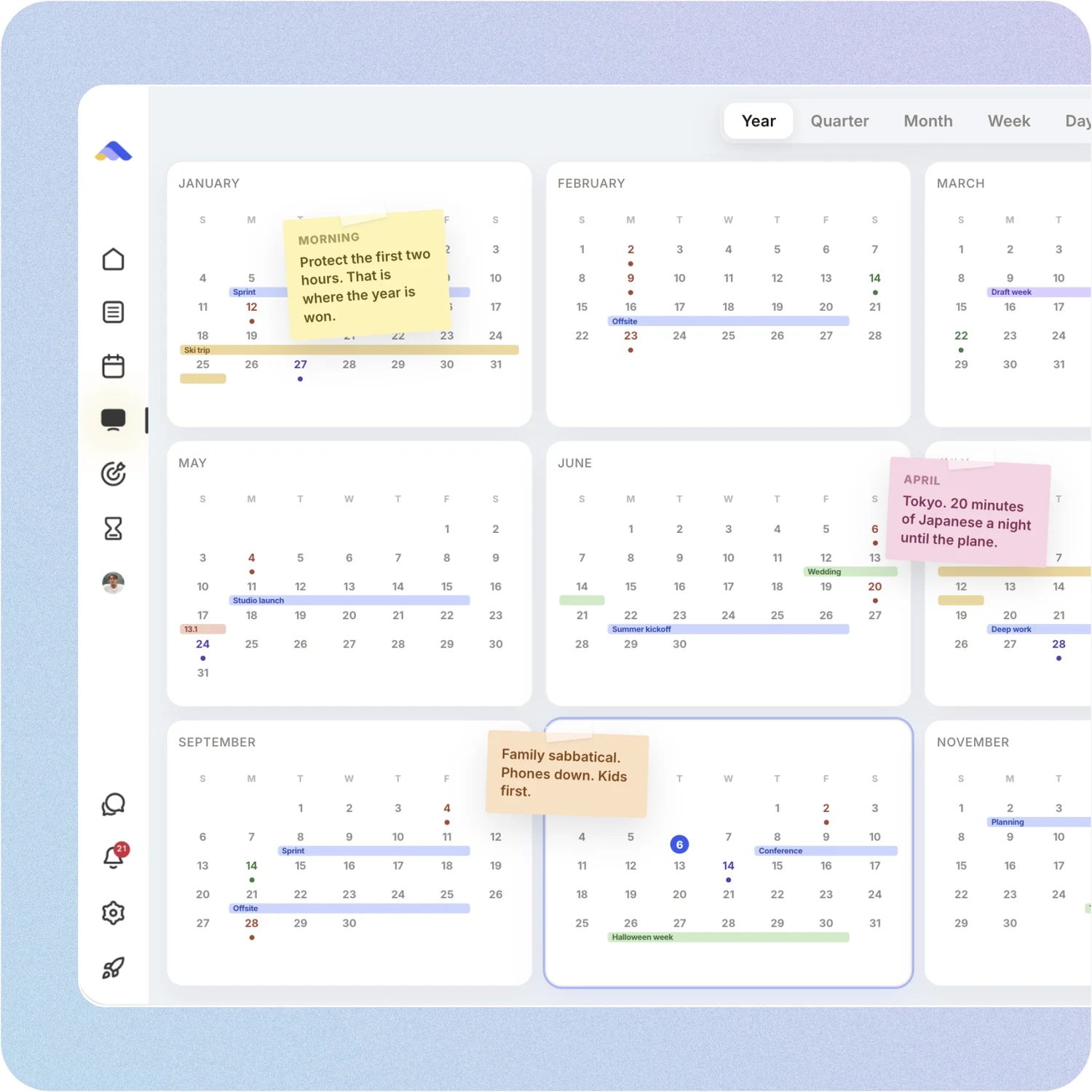
Your whole year on one surface
The planning canvas zooms from the full year down to a single day. Pin goals, notes and milestones where they belong, drag anything, and the plan keeps up.
Sunsama: Sunsama plans in kanban day columns, a Calendar View for the week ahead, and weekly objectives. Month and year views aren’t documented.
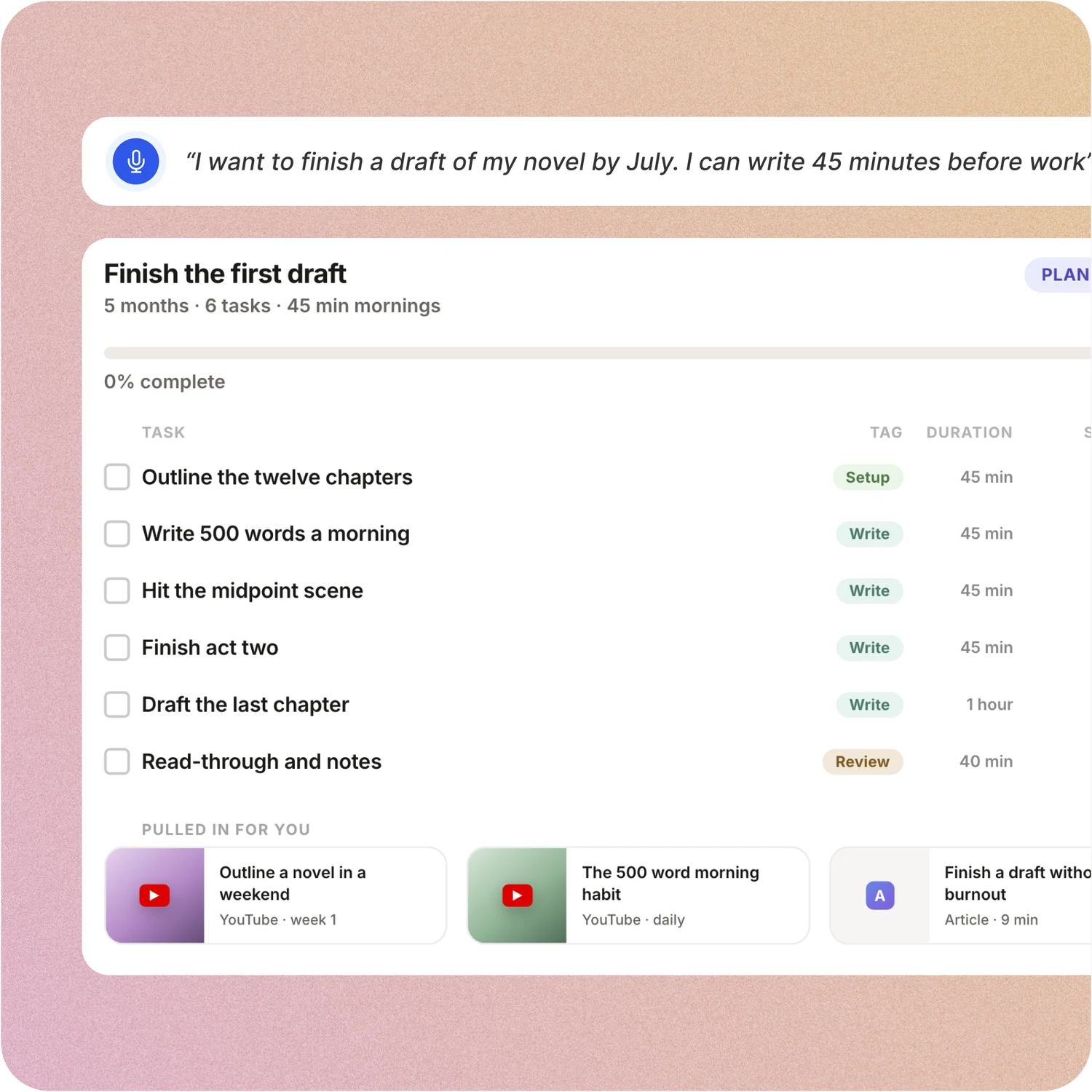
Say the goal. Get a scheduled plan.
Tell ByDesign what you want to achieve. It asks a few questions, then builds the tasks, subtasks, courses and deadlines and schedules them around the life you already have. Replan in one message.
Sunsama: Sunny can create, edit and timebox tasks and organise a braindump into your backlog. It doesn’t turn a goal into a plan with courses and deadlines.
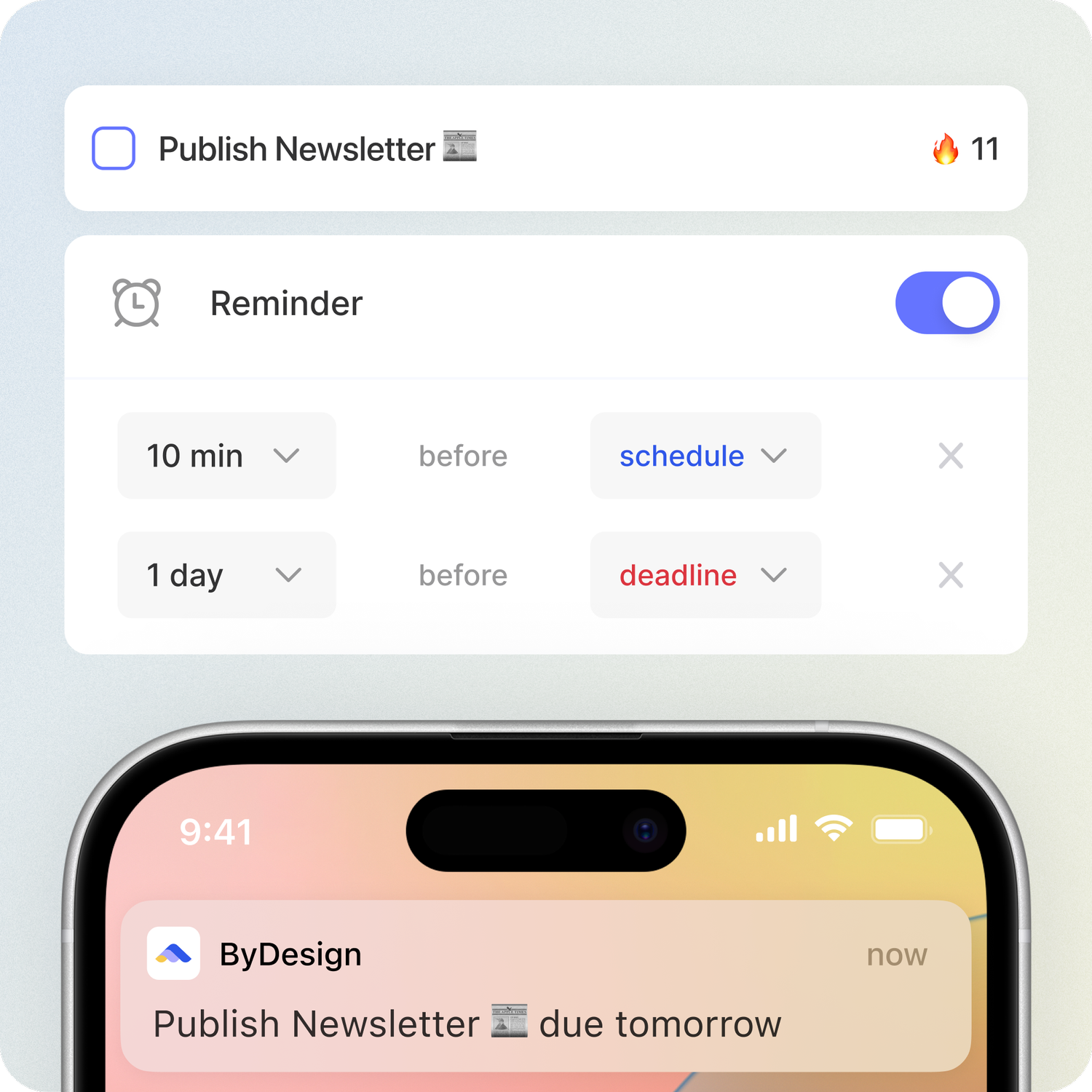
Habits, goals and focus, built in
Track habits with streaks and stats, keep goal pages with progress, run a Pomodoro and track time on any task. Open ByDesign in the morning and it already works.
Sunsama: Sunsama has Pomodoro, focus mode and time tracking too. For habits it suggests checkboxes in task notes, and for long-term goals it points you to another tool.
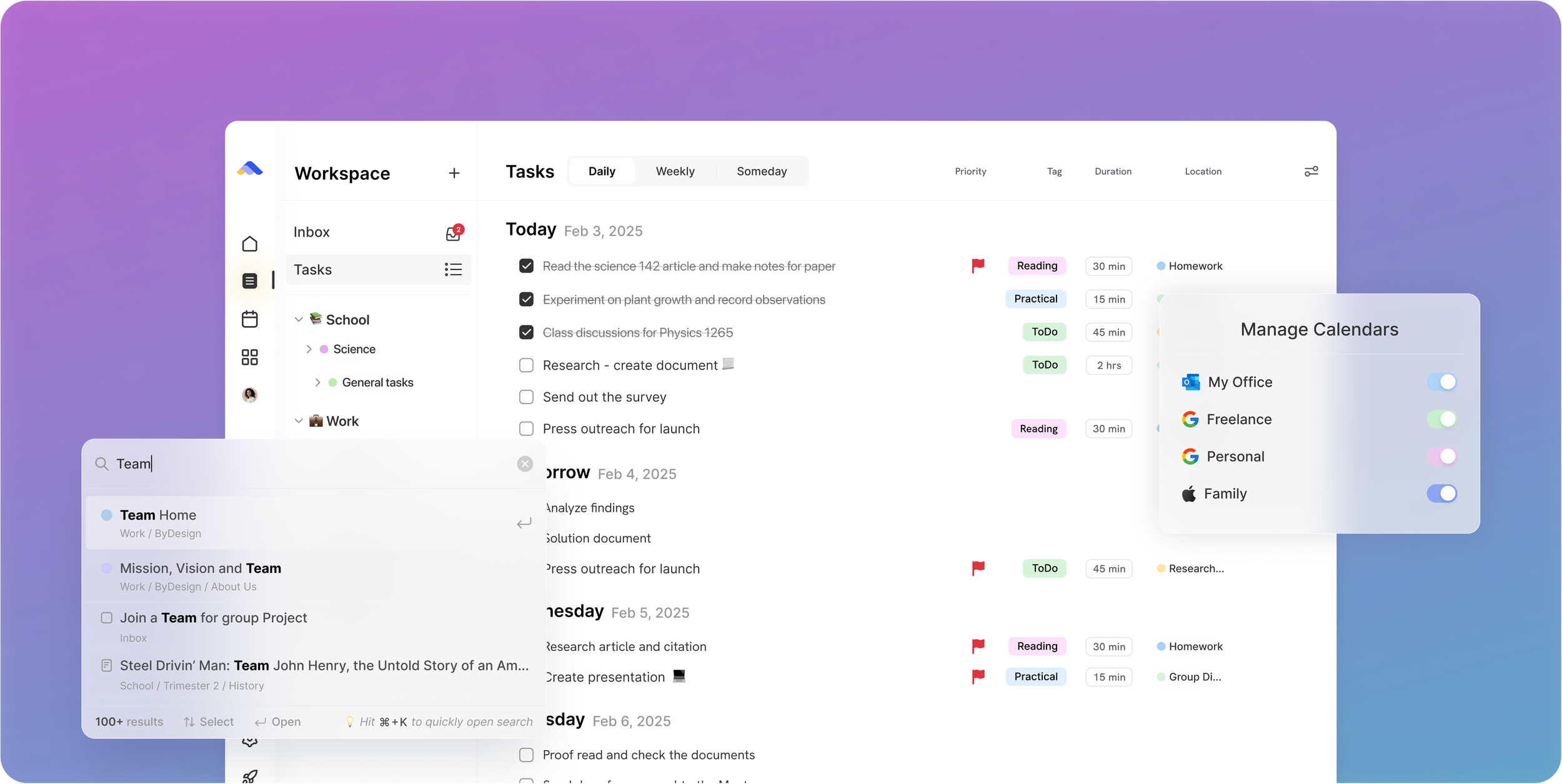
A workspace your team can live in
Share pages with view, comment or edit access, assign tasks, @mention people in comments and chat without leaving the app. Add seats from the app on a team plan.
Sunsama: Sunsama’s shared workspace puts teammates on one bill and lets them see, assign and comment on tasks. Plans go out to Slack or Teams; there are no shared pages and no chat.
Don’t take our word for it.
From Petey M.
I used to keep a calendar, a to-do list, and a project app. ByDesign replaced all of them. It’s clean, it works, and I haven’t needed anything else.
From Daniel
Honestly, Notion was really exhausting for me... Your product works in the simplest way. I’m a product designer, and I’d love to share my feedback with you after using it more :)
From TuneOutlyson003
I just wanna say that I have FINALLY found a to-do list app where I can have recurring tasks and habit/org systems in one place. This is awesome because I keep wondering if one day my autonomous self will break....this is awesome so far!
Make the switch in three steps
No setup project. Start free, connect the calendar you already use, and give ByDesign your first goal.
- Start your free trial. No credit card.
- Connect your Google, Apple or Outlook calendar.
- Say your first goal and watch the plan land on your calendar.
Ready to plan the year, not just the workday?
Start free. No credit card. Tell ByDesign a goal and watch the plan land on your calendar.
Try ByDesign free