

Comparison

 Timestripe
ByDesign vs Timestripe
Timestripe lines your goals up by horizon. ByDesign builds the plan and runs it.
Timestripe is a goal planner built on Horizons: side-by-side columns for the day, week, month, year and beyond, with boards, Climbs and team Spaces. ByDesign keeps the long view on one zoomable year-to-day canvas and adds what Timestripe leaves to you: AI that turns a goal into scheduled tasks, two-way calendar sync, habits with stats, a Pomodoro timer, time tracking and chat.
What you get with ByDesign that Timestripe doesn’t offer
AI that builds the plan
Say a goal and ByDesign writes the tasks, subtasks, courses and deadlines, then schedules them around your hours with a preview you approve. Timestripe has no AI inside the app; its route is a command-line tool that lets an agent such as Claude Code edit your goals.
A calendar that syncs both ways
Edit an event in ByDesign or in Google and Apple Calendar and both stay right, with Outlook and ICS subscriptions too. Timestripe sends goals to Google or Apple Calendar as all-day events, one way; its FAQ says two-way Google sync isn’t there “right now” but is planned.
A canvas, not columns
Year, quarter, month, week and day on one zoomable surface, with sticky notes, images and pinned pages wherever you want them. Timestripe’s Horizons are columns of goals per period, and its images live inside each goal.
Habits, focus and chat built in
A habit tracker with streaks and stats, a Pomodoro timer, time tracking on any task, voice control and team chat. Timestripe repeats goals as habits, counts completions in Insights, and talks in comments.
ByDesign vs Timestripe, feature by feature
Only the differences. What both apps do the same is listed underneath.
- Included
- Limited
- Not available
AI planning
AI goal plans
ByDesign
Included: Built and scheduledTasks, subtasks, courses and deadlines land on your calendar; AI and AI Plus plansTimestripe
Limited: ClimbsPre-written step-by-step programmes from the community or your own; not built from your goalAI scheduling with a preview you approve
ByDesign
Included: Preview, then acceptConflicts shown; nothing saves until you say so; AI and AI Plus plansTimestripe
Not available: No AI in the appA command-line tool lets outside agents such as Claude Code edit your goalsAuto-schedule around your hours
ByDesign
Included: Rules you setWork hours, breaks, buffers, max hours a day, split long tasksTimestripe
Not available: ManualType a time into the goal title or drag it onto the day’s timetablePlanning assistant chat
ByDesign
Included: In the app, full contextSees your calendar, goals, habits and notes; moves and reschedules items; AI and AI Plus plansTimestripe
Limited: Through an agent you installThe Timestripe CLI works with Claude Code, Codex and Cursor in plain language; nothing to talk to inside the appVoice control
ByDesign
Included: Mic and hands-freeOptional wake phrase; AI and AI Plus plansTimestripe
Not available: No
Calendar and views
Two-way calendar sync
ByDesign
Included: Google and AppleEdit events in either place; Outlook and ICS subscriptions tooTimestripe
Limited: One-way to Google and AppleGoals appear there as all-day events; two-way Google sync isn’t there “right now” and is planned, per the FAQSticky notes, images and pinned pages on the calendar
ByDesign
Included: YesTimestripe
Not available: Inside goalsImages, files and embeds attach to a goalCustomisable dashboard
ByDesign
Included: Drag-and-drop widgetsScore board, tasks, habits, inbox, pinned pages, KanbanTimestripe
Limited: Insights and favouritesCompletion stats and a streak; pin goals and notes to the sidebarSync across devices
ByDesign
Included: All your devicesTimestripe
Limited: Not real-time“We don’t have a real time synchronisation now” between web and mobile, per the FAQ
Habits, focus and learning
Habit tracker
ByDesign
Included: Check-ins and streaksSkip a day, stats, habits with friendsTimestripe
Limited: Recurring goalsRepeat a goal daily, weekly or on a custom schedule; Insights counts completed goals and a streakPomodoro timer
ByDesign
Included: Built in25/5/15 cycles with a floating timerTimestripe
Not available: The magazine explains the techniqueTime tracking on tasks
ByDesign
Included: Start and pause on any taskTotals per task; “most tracked” filterTimestripe
Limited: Planned time onlyGive a goal a start and end time on the timetable; no start-and-stop timer on tasksCourses and roadmaps from the Hub
ByDesign
Included: The HubCourses, roadmaps and a habit library; schedule a roadmap straight onto your calendarTimestripe
Limited: Climbs and templatesStep-by-step programmes and community board templates
Collaboration and platforms
MCP for Claude, ChatGPT and other assistants
ByDesign
Included: YesClaude Desktop, Claude Code and ChatGPT guidesTimestripe
Limited: CLI for agentsClaude Code, Codex and Cursor run terminal commands against your account; the guide’s route is a CLI, not MCPBuilt-in chat
ByDesign
Included: Direct and groupThreads, reactions, pollsTimestripe
Not available: Comments with @mentions insteadTeam plans
ByDesign
Included: Per seatAdd or remove members in settingsTimestripe
Limited: By emailEmail the team size and billing period to get a team plan, per the FAQApps
ByDesign
Included: Web, Mac, Windows, iOS, iPad and AndroidTimestripe
Limited: Web, iPhone, iPad, Android and MacPlus Chrome and Firefox extensions; Windows isn’t on Timestripe’s download list
Timestripe column based on features, FAQ, calendar sync, time blocking, AI agents guide, Insights, comments and assignments, June 2025 update, November 2025 update and March 2026 update on October 26, 2026. If something has changed, email info@bydesign.io.
Both apps cover the basics
- Planning views from the day to the year
- Goals broken into smaller steps
- Recurring tasks with custom schedules
- Time blocking
- Notes with rich text, files and embeds
- Boards and lists
- Shared workspaces with assignments and comments
- Public share links
- Tags
- Dark mode
- Home-screen widgets
- Keyboard shortcuts
- Multiple interface languages
Why people switch from Timestripe to ByDesign
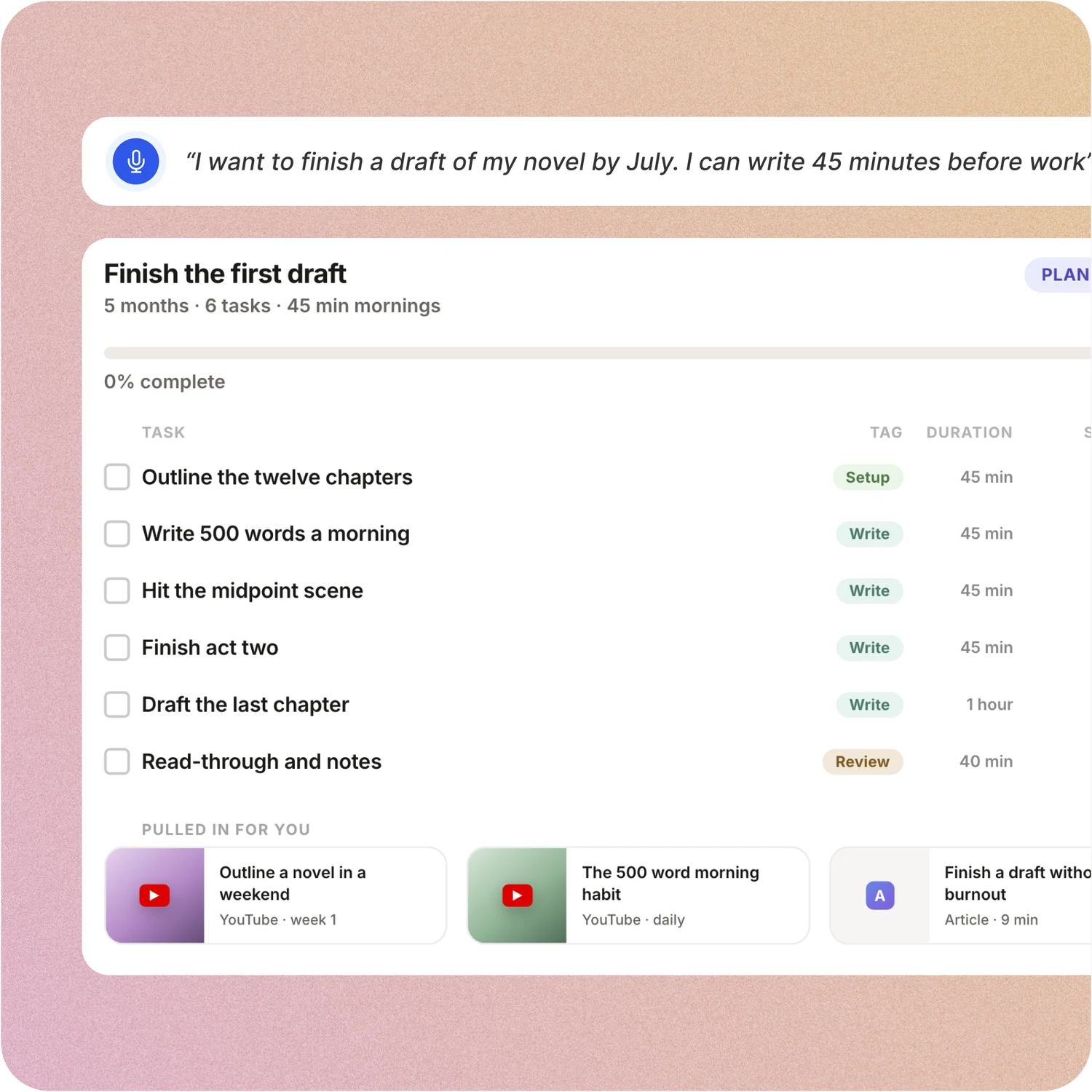
Say the goal. Get a scheduled plan.
Tell ByDesign what you want to achieve. It asks a few questions, then builds the tasks, subtasks, courses and deadlines and schedules them around the life you already have. Replan in one message.
Timestripe: In Timestripe you write the goal, split it into subgoals by hand and place them across the Day, Week, Month and Year horizons yourself. Nothing is generated or scheduled for you.
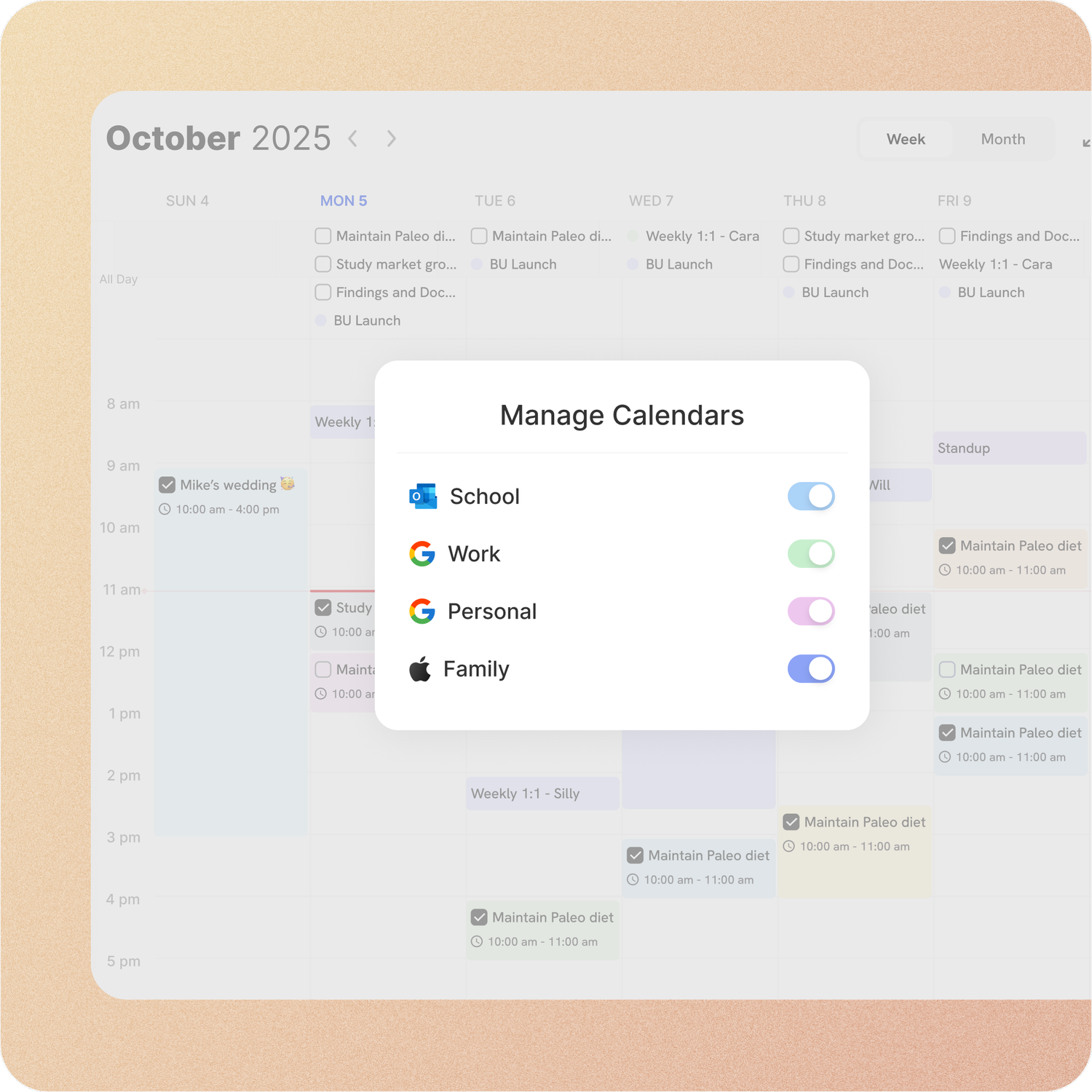
Your calendar, both ways
Connect Google or Apple Calendar and edit an event in either place, with Outlook and ICS subscriptions too. Auto-scheduling fills the real gaps around the meetings already there.
Timestripe: Timestripe pushes your goals into Google or Apple Calendar as all-day events, one way. Its FAQ says two-way Google sync isn’t there “right now” but is planned, and scheduling means typing a time into the goal or dragging it onto the day’s timetable.
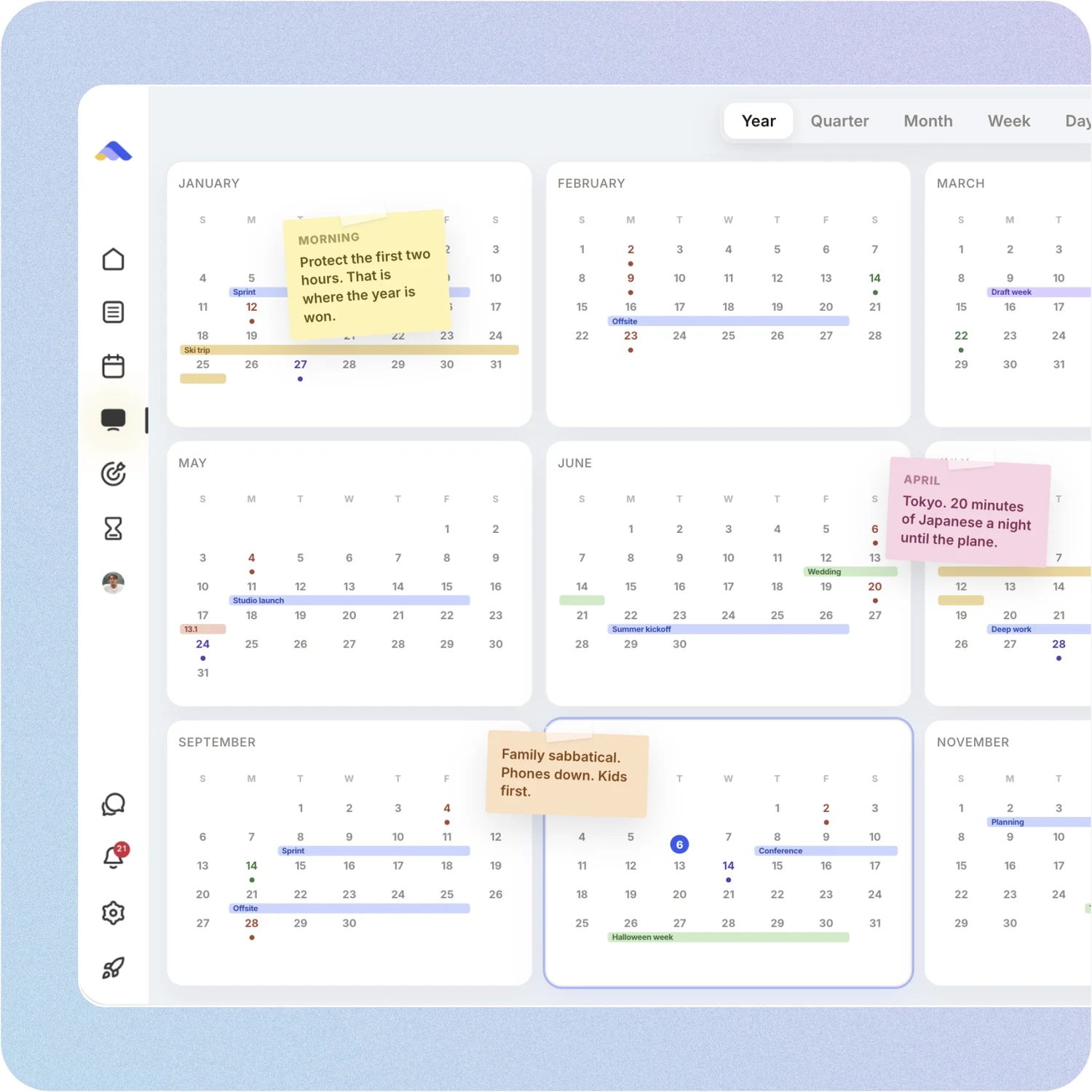
Your whole year on one surface
The planning canvas zooms from the full year down to a single day. Pin goals, notes and milestones where they belong, drag anything, and the plan keeps up.
Timestripe: Timestripe shows the same stretch as columns: a list of goals for the day, the week, the month, the year, out to decades and a lifetime. Clear, but it is a list. Notes and images don’t sit on the plan itself.
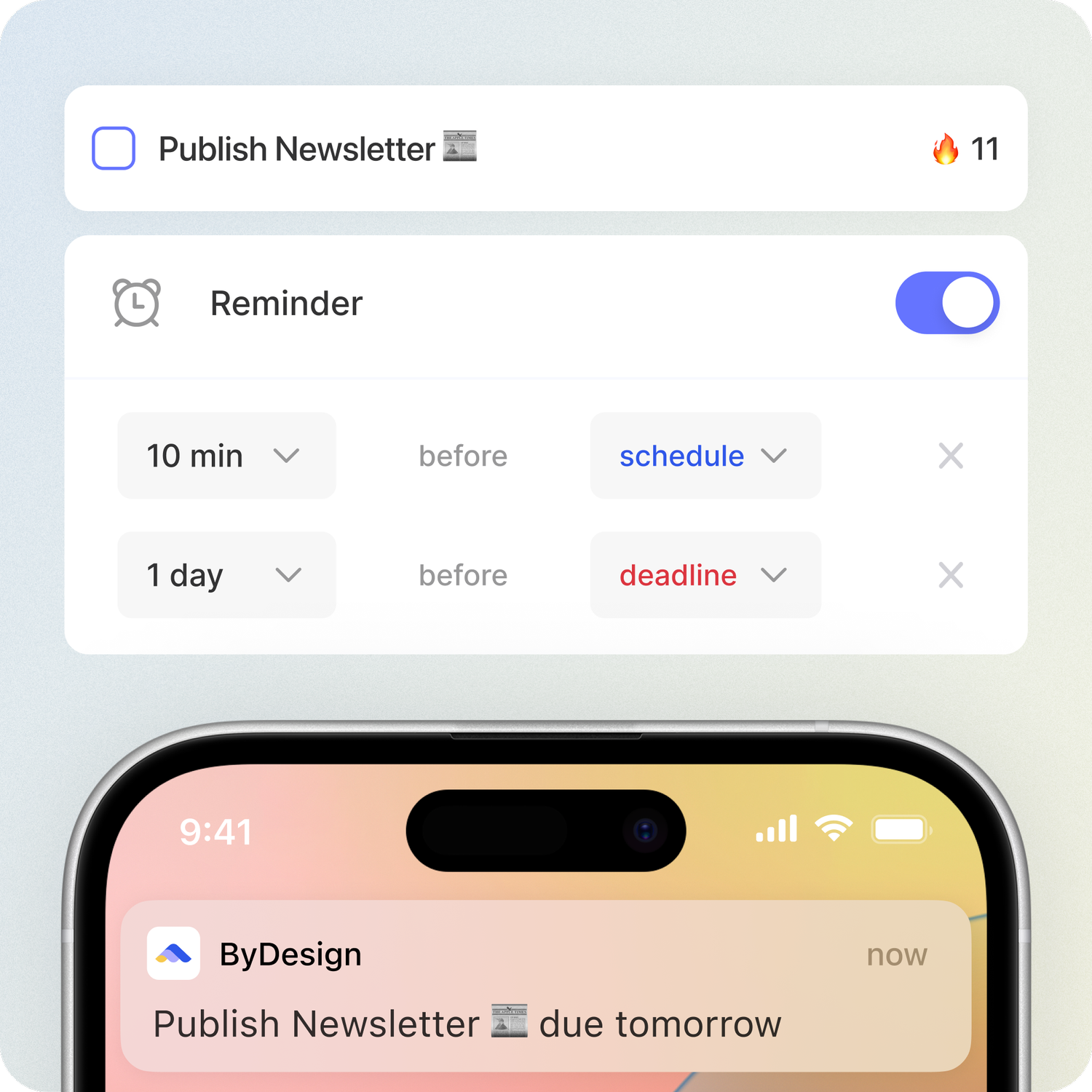
Habits, focus and a team that can talk
Track habits with streaks and stats, run a Pomodoro, track time on any task, and chat with your team in threads without leaving the app.
Timestripe: Timestripe builds habits with recurring goals and counts completions in Insights. There is no Pomodoro, no start-and-stop timer on tasks and no chat; teams talk in comments with @mentions.
Don’t take our word for it.
From Petey M.
I used to keep a calendar, a to-do list, and a project app. ByDesign replaced all of them. It’s clean, it works, and I haven’t needed anything else.
From adsm1993
Omg I downloaded the app and this is MY DREAM! Is like an easier onenote/word/calendar/notes in ONE🙏
From N
First off, let me say: ByDesign’s clean, minimal UI is one of the loveliest I’ve used. The overall visual clarity helps me stay focused, and honestly? I find myself oddly fond of it. Also, this might sound funny, but one of the reasons I felt drawn to ByDesign is something you once wrote: that you’re a “productivity app addict.” As someone who’s tried nearly every productivity app under the sun... I felt so seen. That’s when I knew: Okay, this one’s made by someone like me. With love (and a very biased eye) from your fan, Narae 😊💜
Make the switch in three steps
No setup project. Start free, connect the calendar you already use, and give ByDesign your first goal.
- Start your free trial. No credit card.
- Connect your Google, Apple or Outlook calendar.
- Say your first goal and watch the plan land on your calendar.
Ready for the long view and a plan that runs itself?
Start free. No credit card. Tell ByDesign a goal and watch the plan land on your calendar.
Try ByDesign free