

Comparison

 Tweek
TweekByDesign vs Tweek
Tweek keeps the week simple. ByDesign keeps the whole plan running.
Tweek is a minimalist weekly planner: the week on one screen, Someday lists below it, notes on any task, shared and published calendars, and Premium for subtasks, recurring tasks, reminders, a month view and calendar sync. ByDesign starts from the goal: AI builds the tasks and schedules them around your hours with a preview you approve, your calendar syncs both ways, and habits, goal pages, Kanban, a Pomodoro timer and chat live in the same app.
What you get with ByDesign that Tweek doesn’t offer
AI that plans the week for you
Say a goal and ByDesign writes the tasks, subtasks, courses and deadlines and places them on your calendar for your approval. Tweek has no AI inside the app; its ChatGPT and Claude apps and MCP server act on your tasks from outside, and unfinished tasks roll to tomorrow.
A calendar that syncs both ways
Edit an event in ByDesign or in Google and Apple Calendar and both stay right, with Outlook and ICS subscriptions too. Tweek syncs titles and dates with Google both ways on Premium, but tasks created in Tweek “are not sent to your Google Calendar”, and Outlook sync is one way, per its help page.
Habits, goals, focus and the long view
A habit tracker with streaks, goal pages, a Pomodoro timer, time tracking, Kanban boards and a canvas from the year to the day. Tweek has a week, a Premium month view and Someday lists; its facts page says “there are no boards”.
Assign it and talk about it
Share pages, assign tasks, @mention in comments and chat in the app on a per-seat team plan. Tweek shares and publishes calendars in real time with anyone, with no assignees or comments, and its paid plans are Individual and Family.
ByDesign vs Tweek, feature by feature
Only the differences. What both apps do the same is listed underneath.
- Included
- Limited
- Not available
AI planning
AI goal plans
ByDesign
Included: Built and scheduledTasks, subtasks, courses and deadlines land on your calendar; AI and AI Plus plansTweek
Not available: ChatGPT and Claude appsAct on your tasks from outside Tweek; no AI inside the appAI scheduling with a preview you approve
ByDesign
Included: Preview, then acceptConflicts shown; nothing saves until you say so; AI and AI Plus plansTweek
Not available: NoAuto-schedule around your hours
ByDesign
Included: Rules you setWork hours, breaks, buffers, max hours a day, split long tasksTweek
Not available: RolloverUnfinished tasks roll to tomorrowPlanning assistant chat
ByDesign
Included: In the app, full contextSees your calendar, goals, habits and notes; moves and reschedules items; AI and AI Plus plansTweek
Limited: ChatGPT and Claude appsPlus an MCP server; nothing inside TweekVoice control
ByDesign
Included: Mic and hands-freeOptional wake phrase; AI and AI Plus plansTweek
Limited: Siri through Apple RemindersPremium, in the Apple app
Calendar and views
Two-way calendar sync
ByDesign
Included: Google and AppleEdit events in either place; Outlook and ICS subscriptions tooTweek
Limited: Google and Apple two-way on PremiumTitles, notes and dates sync both ways, Apple through the iPhone app; deletions, completions and recurring events go one way; tasks made in Tweek “are not sent to your Google Calendar”; Outlook is one way, per its help pageYear-to-day planning canvas
ByDesign
Included: Year to dayYear, quarter, month, week and day on one zoomable surface; AI and AI Plus plansTweek
Limited: Day, week and monthMonth view on Premium; no year viewKanban boards
ByDesign
Included: Custom columnsMain board plus boards per pageTweek
Not available: “There are no boards”, per TweekSticky notes, images and pinned pages on the calendar
ByDesign
Included: YesTweek
Not available: NoCustomisable dashboard
ByDesign
Included: Drag-and-drop widgetsScore board, tasks, habits, inbox, pinned pages, KanbanTweek
Not available: No
Habits, goals and focus
Habit tracker
ByDesign
Included: Check-ins and streaksSkip a day, stats, habits with friendsTweek
Not available: NoGoals with progress
ByDesign
Included: Goal pagesTasks, resources, percent complete, shareableTweek
Not available: NoNotes and pages
ByDesign
Included: Nested pagesTables, code, embeds, sub-pages, backlinks; publish to the webTweek
Limited: Notes on tasksCourses and roadmaps from the Hub
ByDesign
Included: The HubCourses, roadmaps and a habit library; schedule a roadmap straight onto your calendarTweek
Not available: A printable weekly template and guidesPomodoro timer
ByDesign
Included: Built in25/5/15 cycles with a floating timerTweek
Not available: NoTime tracking on tasks
ByDesign
Included: Start and pause on any taskTotals per task; “most tracked” filterTweek
Not available: A time of day on tasks; no timer
Collaboration and platforms
Share pages and assign tasks
ByDesign
Included: View, comment or editAssign tasks; @mention in commentsTweek
Limited: Shared and published calendarsReal-time sharing for free; no assignees, per its facts pageBuilt-in chat
ByDesign
Included: Direct and groupThreads, reactions, pollsTweek
Not available: NoTeam plans
ByDesign
Included: Per seatAdd or remove members in settingsTweek
Limited: Shared calendars for anyoneFree accounts can collaborate; paid plans are Individual and Family, with no per-seat team planApps
ByDesign
Included: Web, Mac, Windows, iOS, iPad and AndroidTweek
Limited: Web, iOS, iPad and AndroidNo desktop app: Macs with Apple silicon run the iPad app; Windows uses the browser
Tweek column based on features, facts, help, pricing, MCP, changelog, desktop app and Google sync on October 26, 2026. If something has changed, email info@bydesign.io.
Both apps cover the basics
- A weekly planning view
- Notes on tasks
- Recurring tasks and reminders
- A time of day on tasks
- MCP server for AI assistants
- Dark mode
- Sync across devices
Why people switch from Tweek to ByDesign
Say the goal. Get a scheduled plan.
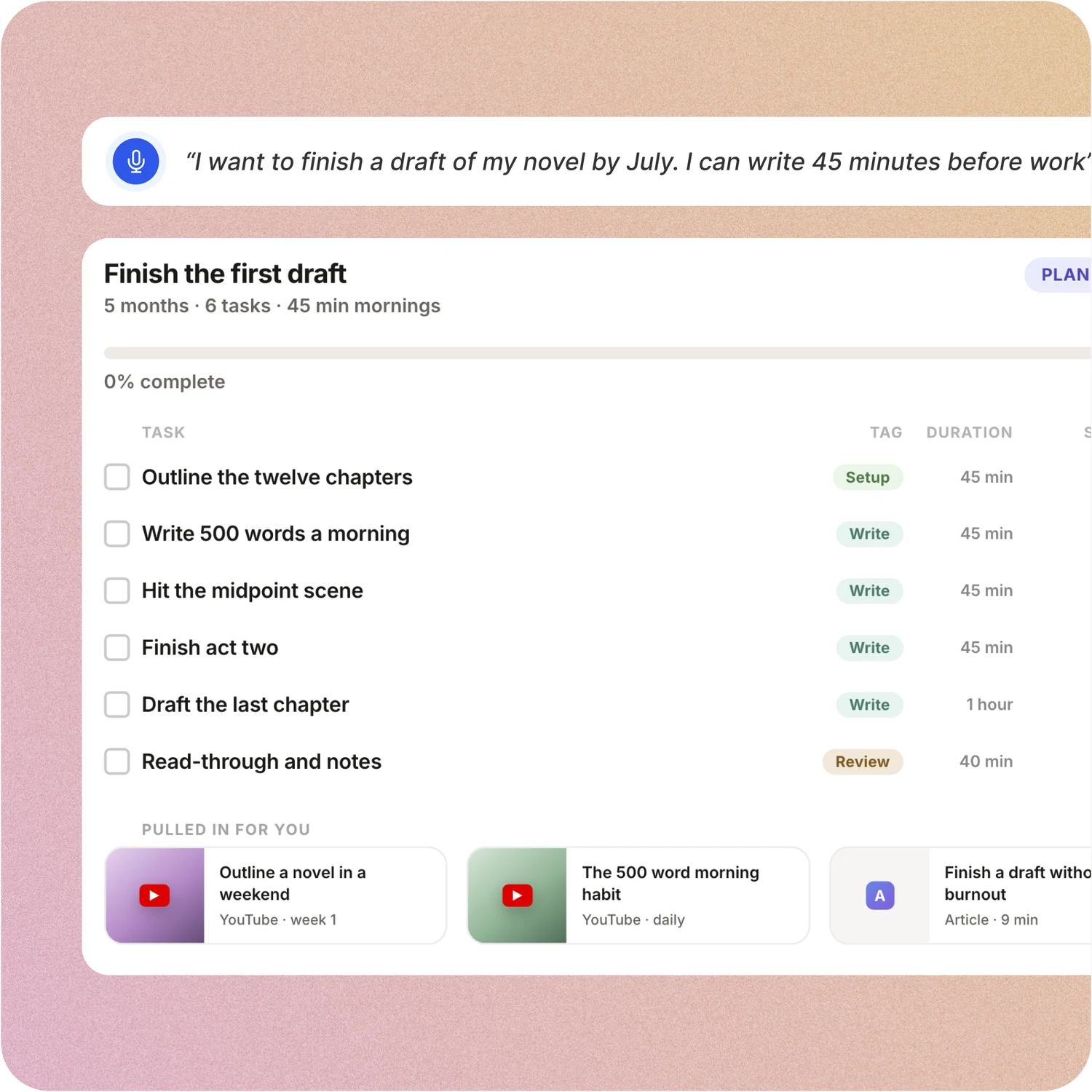
Tell ByDesign what you want to achieve. It asks a few questions, then builds the tasks, subtasks, courses and deadlines and schedules them around the life you already have. Replan in one message.
Tweek: In Tweek you write tasks into the days of the week and park the rest in Someday. ChatGPT and Claude can add or move tasks through Tweek’s connectors, but nothing turns a goal into a plan or fills your week around your hours.
Your calendar, both ways
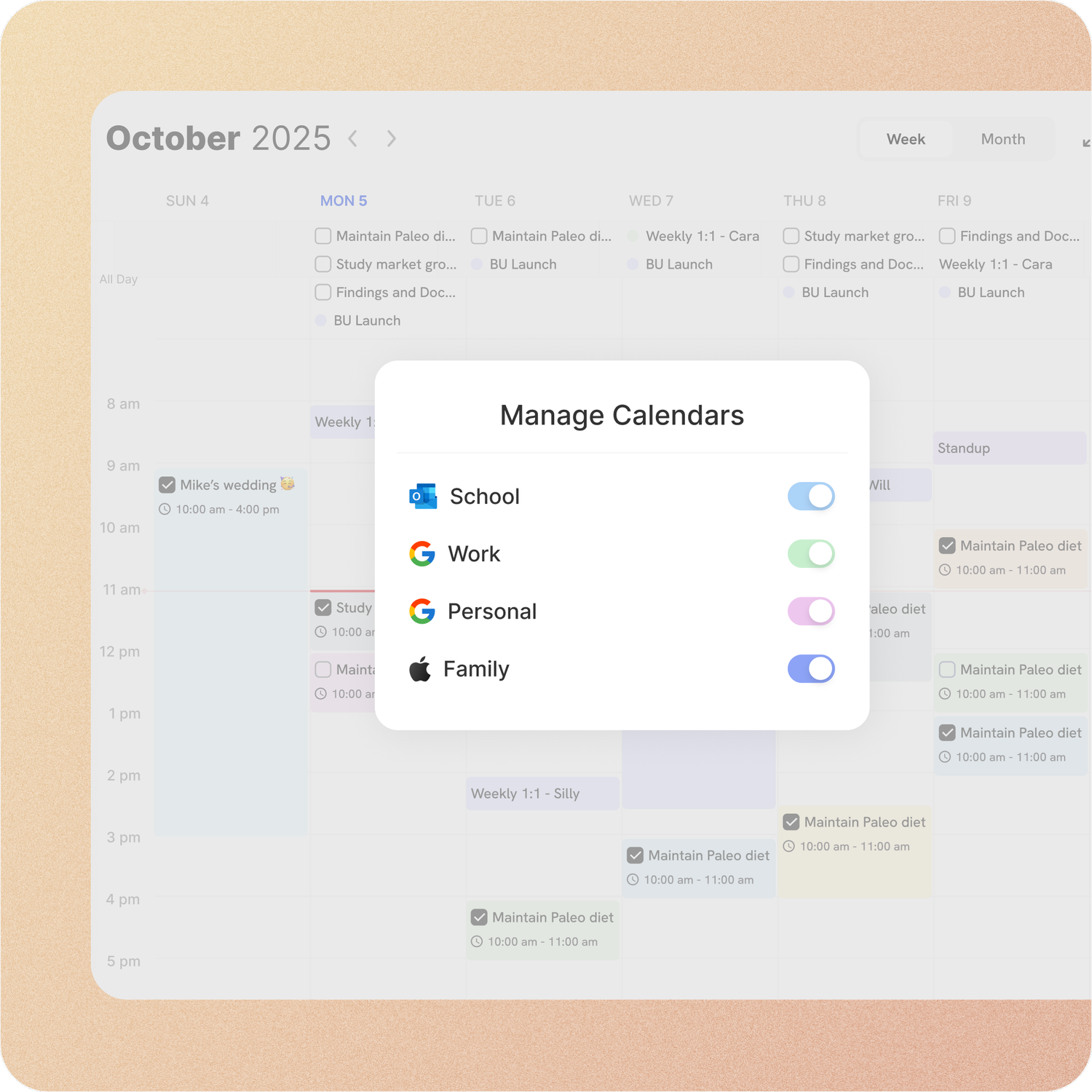
Connect Google or Apple Calendar and edit an event in either place, with Outlook and ICS subscriptions too. Auto-scheduling fills the real gaps around the meetings already there.
Tweek: Tweek’s Google sync carries titles, descriptions and dates both ways on Premium, but tasks created in Tweek stay in Tweek. Outlook flows one way, per its help page, Apple Calendar edits sync through the iPhone app, and there is no time blocking or auto-scheduling.
Your whole year on one surface
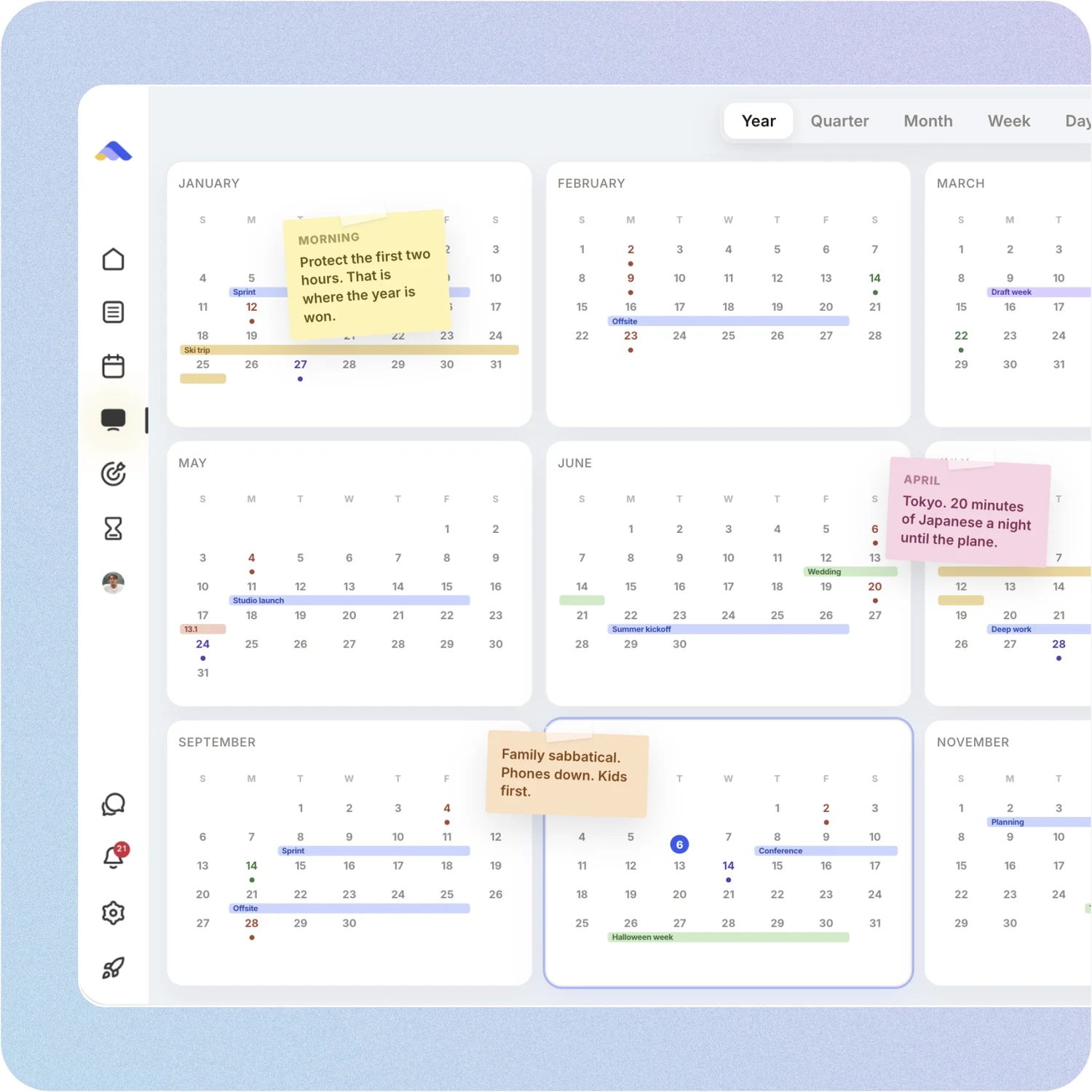
The planning canvas zooms from the full year down to a single day. Pin goals, notes and milestones where they belong, drag anything, and the plan keeps up.
Tweek: Tweek shows the week, a month view on Premium, and Someday lists. There is no year view, no boards and no canvas for sticky notes and images.
A workspace your team can live in
Share pages with view, comment or edit access, assign tasks, @mention people in comments and chat without leaving the app. Add seats from the app on a team plan.
Tweek: Tweek lets you share a calendar in real time or publish it to the web for free. Its facts page says there are no assignees, and its docs describe no comments or chat, and its paid plans are Individual and Family.
Don’t take our word for it.
From Daniel
Honestly, Notion was really exhausting for me... Your product works in the simplest way. I’m a product designer, and I’d love to share my feedback with you after using it more :)
From E
I really like ByDesign - a lot. I was looking for something that works for me but is also simple and intuitive enough to work for my 12 yr old daughter who needs to start planning out her homework and chores around her other calendar events. I think this is it - and I have looked at a lot of your competitors - Notion, Motion, Tick Tick, To-Do, Todoist. None have the simplicity of user interface combined with the rich features (but not overly complex). love it😍
From Callio
Can I just say I love you. Finally, a good-looking app that isn’t complex as hell. There are tears in my eyes. I’ll happily pay for this!💯
Make the switch in three steps
No setup project. Start free, connect the calendar you already use, and give ByDesign your first goal.
- Start your free trial. No credit card.
- Connect your Google, Apple or Outlook calendar.
- Say your first goal and watch the plan land on your calendar.
Ready for more than a week at a time?
Start free. No credit card. Tell ByDesign a goal and watch the plan land on your calendar.
Try ByDesign free