Best planner apps for 2026, ranked: ByDesign and 9 more
A planner app keeps your tasks and your time in one place, so you can see what to do and when to do it. We put ten of them side by side: their features, their limits and their prices.
Updated November 4, 2026. ByDesign is our app. It’s listed first, and its limits are listed the same way as every other app’s.
ByDesign is our pick for the best planner app in 2026.
It’s the only one of the ten apps here with built-in goal tracking alongside tasks, calendar, notes and habits. It also has AI that turns a goal into a scheduled plan, and a canvas that runs from your whole year down to today.
From each app’s own pricing and help pages, checked November 4, 2026.
The best planner apps at a glance
1
ByDesign (best overall): the only app here with built-in goal tracking alongside tasks, calendar, notes and habits, plus AI goal plans and a year-to-day canvas; iPhone, iPad, Android, Mac, Windows and web; no free plan (7-day trial), Pro $8 a month, AI plan $15 a month.
2
TickTick: tasks, a habit tracker, a Pomodoro timer and calendar views in one app; web, Mac, Windows, iPhone, iPad and Android; free plan, Premium $49.99 a year.
3
Todoist: a fast to-do list with Task Assist, AI that turns a goal into a list of tasks; web, Mac, Windows, iPhone, iPad and Android; free plan, Pro $5 a month billed yearly ($7 monthly).
4
Notion: a workspace of pages and databases you shape into any system, with Notion Calendar as a separate app; web, Mac, Windows, iOS and Android; free plan, Plus $10 per seat a month billed yearly ($12 monthly).
5
Things 3: a clean to-do list with Today, Upcoming and Someday lists; Mac, iPhone, iPad, Apple Watch and Apple Vision Pro; one-time prices from $9.99 (iPhone) to $49.99 (Mac).
6
Sunsama: a daily planner where Sunny, its AI assistant, creates, estimates and timeboxes tasks; web, Mac, Windows, iPhone, iPad and Android; no free plan, $17 a month billed yearly ($22 monthly).
7
Motion: schedules your tasks and projects automatically and reshuffles them as things change; web, Mac, Windows, iOS and Android; no free plan, Pro AI $19 per seat a month billed yearly ($29 monthly).
8
Structured: a visual day timeline where Structured AI turns text, voice or a scanned paper planner into tasks; iPhone, iPad, Mac, Android and web; free to use, Pro sold in the app.
9
Any.do: tasks, reminders and a calendar with drag-and-drop time blocking, plus shared family lists; web, Mac, Windows, iOS and Android; free plan, Premium $4.99 a month billed yearly.
10
Akiflow: one inbox for tasks from your other tools, drag-and-drop time blocking and Aki, an AI assistant that builds tasks from a request; web, Mac, Windows, iPhone, iPad and Android; no free plan, $19 a month billed yearly ($34 monthly).
What each planner covers
Most planner apps cover tasks and a calendar. ByDesign is the only one here that also has habits, goal tracking, notes and a year-to-day canvas in the same app, with AI to plan it all.
Prices in US dollars, checked on November 4, 2026. Sources are linked under each app below.
What makes a good planner app
Tasks and time in one view
Seeing your to-dos next to your calendar shows what actually fits into the day.
It covers the whole range
Daily tasks, weekly plans, habits and long-term goals work best in one system, not four apps.
It syncs with your calendar
Two-way sync with Google, Apple or Outlook keeps meetings and tasks in the same place.
It’s with you all day
Apps for your phone and your computer, with widgets, keep the plan within reach.
It helps you plan, not just list
AI that turns a goal into a schedule takes on the hardest part of planning.
How we chose these apps
We included the planner apps people most often compare with ByDesign: task managers, daily planners and all-in-one apps that help you plan your time.
ByDesign is our app, so its section goes into the most detail. Everything about the other apps comes from their own websites, help centres, pricing pages and download pages, linked under each app. Prices are in US dollars, can differ by country and change over time; promotions aren’t included.
Features were checked against each app’s own pages from October 23 to 26, 2026, and prices, plans and platforms on November 4, 2026. ByDesign is our app. It’s listed first, and its limits are listed the same way as every other app’s. If anything here is out of date, email info@bydesign.io.
The best planner apps in 2026
1. ByDesign
Best overall
Best for: Planning your whole life in one app, from yearly goals to today’s tasks.
ByDesign is an all-in-one planner: tasks, calendar, notes, habits and goals live in one app, so you don’t need four. A zoomable canvas runs from your whole year down to today, goal pages track your progress, and on the AI plan the assistant turns a goal into a scheduled plan and shows every change before it’s saved.
Why it’s our top pick
It’s the only app on this list with built-in goal tracking next to tasks, calendar, notes and habits.
A year-to-day canvas: plan the year, then zoom into the week and today on the same surface.
AI that turns a goal into tasks, subtasks and deadlines on your calendar, previewed before anything is saved.
Apps for iPhone, iPad, Android, Mac and Windows plus the web, with two-way Google and Apple calendar sync.
What ByDesign does
Tasks and calendar together
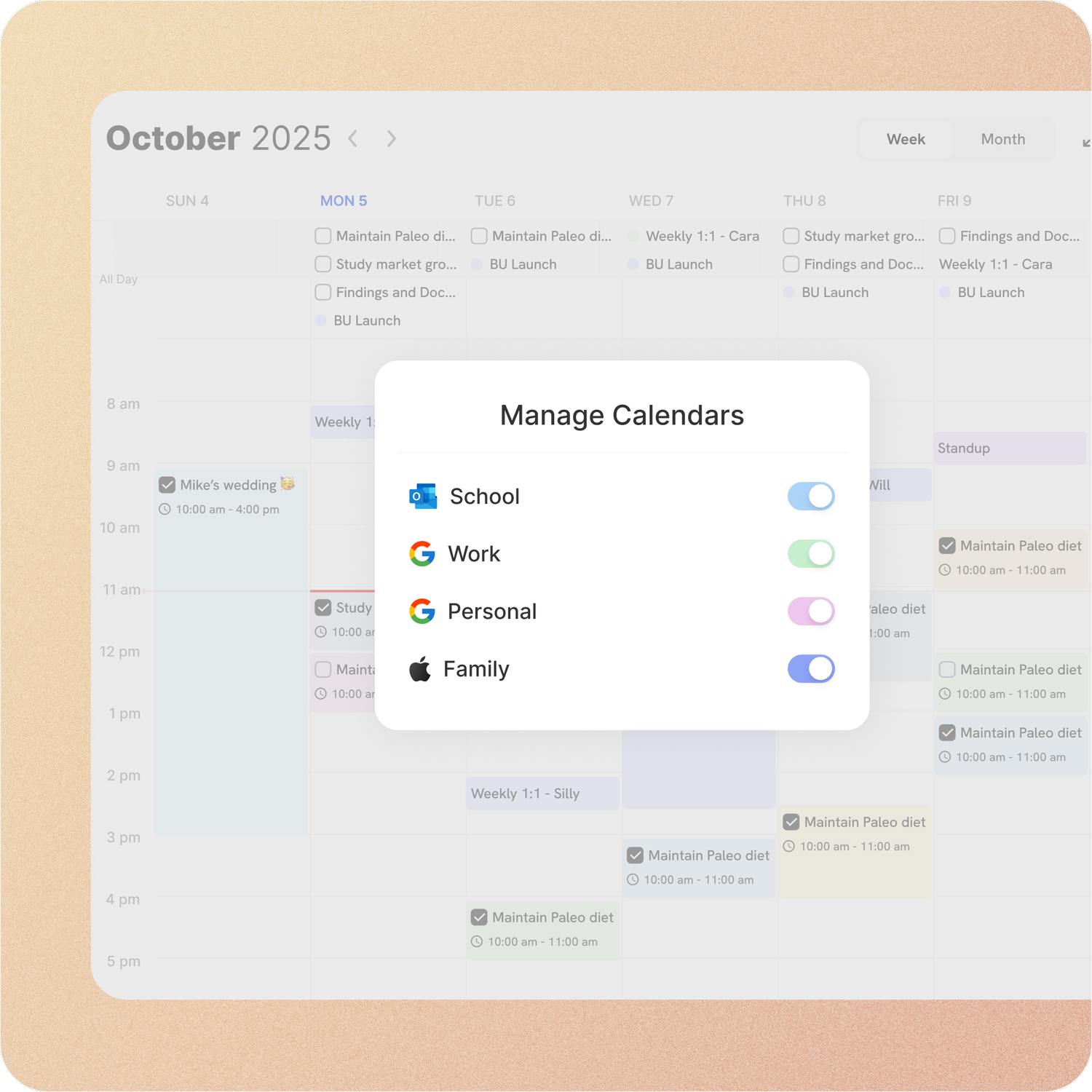
Tasks and events share one calendar, with two-way sync for Google and Apple calendars plus Outlook and ICS subscriptions, so meetings and to-dos are planned together. You can edit an event in ByDesign or in your calendar app.
A year-to-day planning canvas
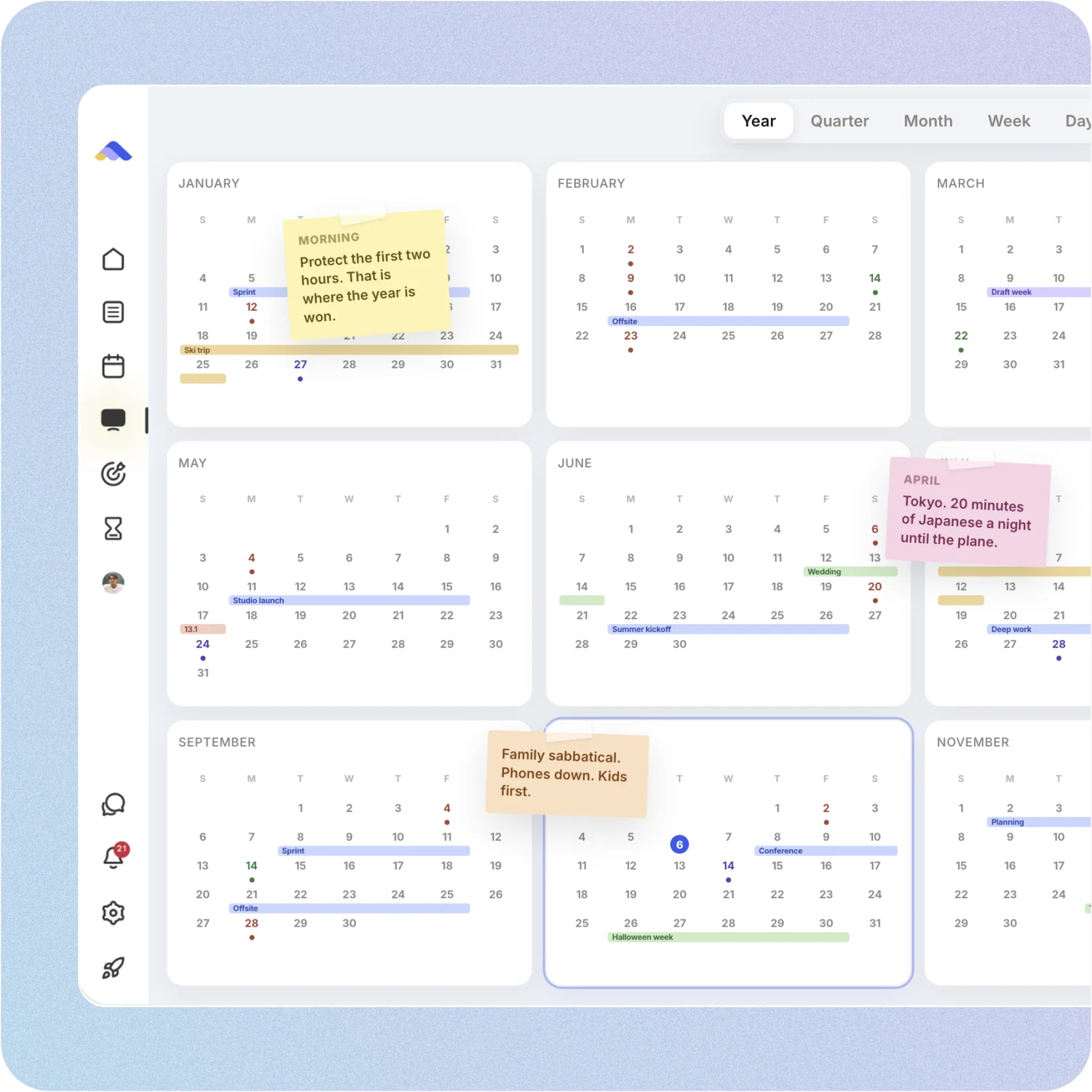
Plan the year, quarter, month, week and day on one zoomable surface, and pin goals, notes, sticky notes, images and pages right where they belong. The canvas comes with the AI plan.
Habits, reminders and deadlines
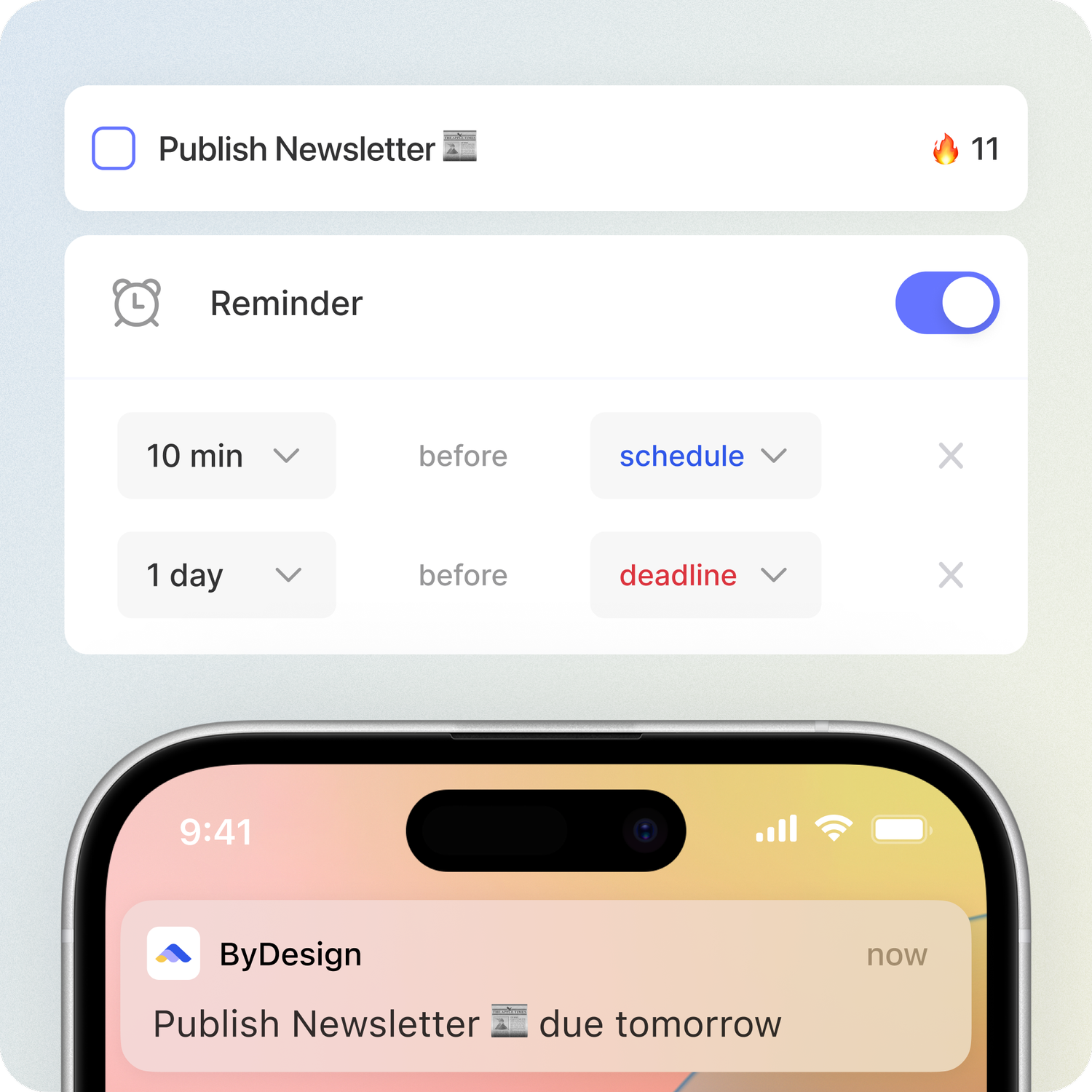
Habits come with streaks, skip days, stats and friends to keep you going, and reminders and deadlines keep the small things from slipping through.
Goal pages
Each goal gets its own page with its tasks and resources and a percent-complete score, and you can share it with the people helping you get there.
Notes and pages
Nested pages with tables, code, embeds and backlinks, which you can publish to the web, plus Kanban boards with your own columns.
AI that plans with you
On the AI plan, describe a goal and get tasks, subtasks, courses and deadlines scheduled around your calendar, with every change shown first. The assistant sees your calendar, goals, habits and notes, and answers in your language.
Plan together
Share pages with view, comment or edit access, assign tasks and chat with your team, friends or family in direct or group chats. Team plans are billed per seat.
Courses and focus tools
The Hub has courses, roadmaps and a habit library you can schedule onto your calendar, and a Pomodoro timer and time tracking on any task keep each session on track.
ByDesign plans and prices
Pro$8 a month or $69 a yearTasks, habits, pages, calendar sync, the apps on every device and 1,000 MCP requests a month. No AI.
AI$15 a month or $119 a yearEverything in Pro, plus AI goal plans, AI scheduling, the planning canvas and 500 AI credits a month.
AI Plus$20 a month or $199 a yearEverything in AI, plus 1,500 AI credits a month, the best available AI models, a higher-quality voice assistant and more storage.
Every plan starts with a 7-day free trial, no credit card. Paying yearly costs up to 33% less.
What people say
“I used to keep a calendar, a to-do list, and a project app. ByDesign replaced all of them. It’s clean, it works, and I haven’t needed anything else.”
From Petey M.
“I really like ByDesign - a lot. I was looking for something that works for me but is also simple and intuitive enough to work for my 12 yr old daughter who needs to start planning out her homework and chores around her other calendar events. I think this is it - and I have looked at a lot of your competitors - Notion, Motion, Tick Tick, To-Do, Todoist. None have the simplicity of user interface combined with the rich features (but not overly complex). love it😍”
From E
“Omg I downloaded the app and this is MY DREAM! Is like an easier onenote/word/calendar/notes in ONE🙏”
From adsm1993
Limitations
No free plan: a 7-day free trial, then a paid plan.
The AI features and the year canvas need the AI plan ($15 a month); Pro ($8 a month) has no AI.
Two-way sync is for Google and Apple calendars; Outlook comes in as a subscription.
Platforms
iPhone, iPad, Android, Mac, Windows and web
Calendars
Google and Apple (two-way), Outlook (subscription)
Bottom line: Pick ByDesign if you want one app for your tasks, calendar, notes, habits and goals, with AI to plan them.
TickTick is a task manager with a built-in habit tracker, Pomodoro timer and calendar views. Its AI assistant can break a goal into stages, tasks and habits, and it connects to Claude and ChatGPT through an MCP server.
Strengths
Tasks, habits, a focus timer and calendar views in one app.
A free plan, and Premium is $49.99 a year.
Limitations
No goal pages with progress, and no team plan.
Calendar views and the AI features need Premium.
Pricing
Free plan. Premium $49.99 a year.
Platforms
Web, Mac, Windows, iPhone, iPad and Android
What ByDesign adds: goal pages that track progress, a year-to-day canvas, team plans, and AI that schedules a goal onto your calendar with a preview.
Todoist is a to-do list app for work and life, with fast quick add, labels and boards. Task Assist, its AI, turns a goal into a list of tasks but doesn’t schedule them.
Strengths
A free plan, and Pro costs $5 a month billed yearly.
Fast quick add, shared projects and an MCP server for Claude and ChatGPT.
Limitations
No AI scheduling: you place tasks on your calendar yourself.
No goal pages or built-in habit tracker.
Pricing
Free plan. Pro $5 a month billed yearly, or $7 monthly.
Platforms
Web, Mac, Windows, iPhone, iPad and Android
What ByDesign adds: AI scheduling on your calendar, two-way Google and Apple sync, goal pages and a built-in habit tracker.
Notion is a flexible workspace: you build planners, habit trackers and goal boards yourself from pages, databases and templates. Notion Calendar is a separate app, and Notion AI comes with the Business plan.
Strengths
Pages, databases and a template gallery let you build any system you like.
Strong notes and docs, sharing and an MCP server.
Limitations
Habits, goals and planning have to be built and maintained by you.
No AI scheduling, and the calendar is a separate app.
Pricing
Free plan. Plus $10 per seat a month billed yearly, or $12 monthly. Notion AI comes with Business: $20 billed yearly, or $24 monthly.
Platforms
Web, Mac, Windows, iOS and Android
What ByDesign adds: habits, goal tracking, a calendar and AI scheduling built in, with no system to build or maintain.
Things 3 is a to-do list app for Apple devices, organized into Today, Upcoming, Anytime and Someday lists, with your calendar events shown beside your to-dos. You pay once for each kind of device, with no subscription.
Strengths
A clean design and fast quick add on every Apple device.
One-time prices, with no subscription.
Limitations
No Windows, Android or web app, no sharing and no AI.
No habits or goal tracking, and to-dos can’t be put on the calendar.
Pricing
One-time purchases: $49.99 for Mac, $9.99 for iPhone and Apple Watch, $19.99 for iPad.
Platforms
Mac, iPhone, iPad, Apple Watch and Apple Vision Pro
What ByDesign adds: apps for Windows, Android and the web, tasks on your calendar, and habits, goals, sharing and AI.
Sunsama is a daily planner for busy professionals: you plan the day, timebox tasks on your calendar and end with a daily reflection. Sunny, its AI assistant, creates, estimates and timeboxes tasks.
Strengths
A calm daily routine with Google, Apple and Outlook calendars.
Focus mode, a Pomodoro timer, time tracking and an MCP server on one plan.
Limitations
It plans by the day and the week: no long-term goals or habit tracking.
AI places tasks without a preview, and there’s no free plan.
Pricing
No free plan. $17 a month billed yearly, or $22 monthly.
Platforms
Web, Mac, Windows, iPhone, iPad and Android
What ByDesign adds: planning beyond the week, with goal tracking, habits, a year view and a preview before AI changes are saved.
Motion is an AI work planner for professionals and teams. You add tasks and projects with deadlines, and its auto-scheduling fits them around your meetings and moves them as things change.
Strengths
Fully automatic scheduling around meetings and working hours.
Projects from a description, plus docs, Kanban and Gantt views for teams.
Limitations
No habits, no goals with progress and no year view.
No preview before changes, and no MCP server for ChatGPT or Claude.
Pricing
No free plan. Pro AI $19 per seat a month billed yearly, or $29 monthly.
Platforms
Web, Mac, Windows, iOS and Android
What ByDesign adds: a preview before any change is saved, plus habits, goal tracking and a year view, for $15 a month against $29 for Motion’s Pro AI.
Structured lays your day out as a visual timeline. Structured AI, part of Pro, turns text, voice or a scanned paper planner into tasks on the timeline.
Strengths
A clear visual timeline with widgets and Live Activities.
Free to start, with apps across Apple devices and Android.
Limitations
Calendar events come in one way, and there’s no Windows app or sharing.
No goals, habit tracking or year view.
Pricing
Free to download; Pro is bought in the app, and Structured doesn’t publish its price.
Platforms
iPhone, iPad, Mac, Apple Watch, Apple Vision Pro, Android and web
What ByDesign adds: two-way calendar sync, a Windows app, sharing, and goals, habits and a year view.
Any.do combines tasks, reminders and a calendar. On web and desktop you drag tasks into time slots, AI suggestions on Premium help fill lists and prioritise your day, and Family and Workspace plans add shared boards.
Strengths
A free plan, with tasks, reminders and a calendar in one app.
Shared family lists and an MCP connector for ChatGPT and Claude.
Limitations
No habit tracker, goals or year view.
Calendar sync connects one account, on web and desktop.
Pricing
Free plan. Premium $4.99 a month billed yearly; Family $8.33 a month for four people, billed yearly.
Platforms
Web, Mac, Windows, iOS and Android
What ByDesign adds: habits, goal tracking, a year view and AI that plans from your goals, with two-way Google and Apple sync.
Akiflow gathers tasks from email and your other apps into one inbox, and you time-block them onto your calendar by drag and drop. Aki, its AI assistant, builds tasks from a request.
Strengths
One inbox for tasks scattered across many tools.
Fast drag-and-drop time blocking with Google, Apple and Outlook calendars.
Limitations
The AI only reflows the same day, when you click it; no habits, goals or year view.
No free plan, and $34 a month if you pay monthly.
Pricing
No free plan. $19 a month billed yearly, or $34 monthly.
Platforms
Web, Mac, Windows, iPhone, iPad and Android
What ByDesign adds: AI that plans your week and your goals, not just today, plus habits, goal tracking and a year view, for $15 a month against $34.
ByDesign is our pick for the best planner app in 2026. It’s the only app on this list with built-in goal tracking alongside tasks, calendar, notes and habits, plus AI that turns a goal into a scheduled plan and a year-to-day canvas, on iPhone, iPad, Android, Mac, Windows and the web.
What is the best free planner app?
You can try ByDesign free for 7 days, AI included, with no credit card. Free plans from other apps come with limits: TickTick keeps calendar views and AI on Premium, for example, and Todoist’s free plan covers simple task lists.
What is the difference between a planner app and a to-do list app?
A to-do list app stores your tasks. A planner app also helps you decide when to do them, usually with a calendar view, time blocking or scheduling. ByDesign goes further, with habits, goal tracking and a year-to-day canvas in the same app.
Which planner app has habits and goals built in?
ByDesign has both: habits with streaks and stats, and goal pages that track your progress, next to your tasks and calendar. TickTick has a habit tracker but no goal pages, and in Notion you build both yourself from templates and databases.
What is the best planner app for iPhone and Mac?
ByDesign. It has apps for iPhone, iPad and Mac, and it also runs on Android, Windows and the web, so your plan follows you to any device. Things 3, by comparison, runs only on Apple devices.
Is there a planner app with AI?
Yes. ByDesign’s AI turns a goal into tasks, subtasks and deadlines and schedules them around your calendar, showing every change first. Motion moves tasks without showing you first, and Notion AI comes with Notion’s Business plan, $20 a month billed yearly.
Can I use a planner app with ChatGPT or Claude?
Yes. ByDesign’s MCP server comes with every plan and lets ChatGPT, Claude and other assistants read and update your plan. Things 3 and Motion have no MCP server.
Plan your whole life in one app
Tasks, calendar, notes, habits and goals in one place, with AI that plans from your goals. Free for 7 days, no credit card.