Best goal setting apps for 2026, ranked: ByDesign and 10 more
A goal setting app helps you decide what you want, break it into steps and track your progress until it’s done. We compared eleven, from habit games and SMART-goal trackers to work tools and AI planners.
Updated November 5, 2026. ByDesign is our app. It’s listed first, and its limits are listed the same way as every other app’s.
For setting and reaching goals in 2026, ByDesign comes out on top.
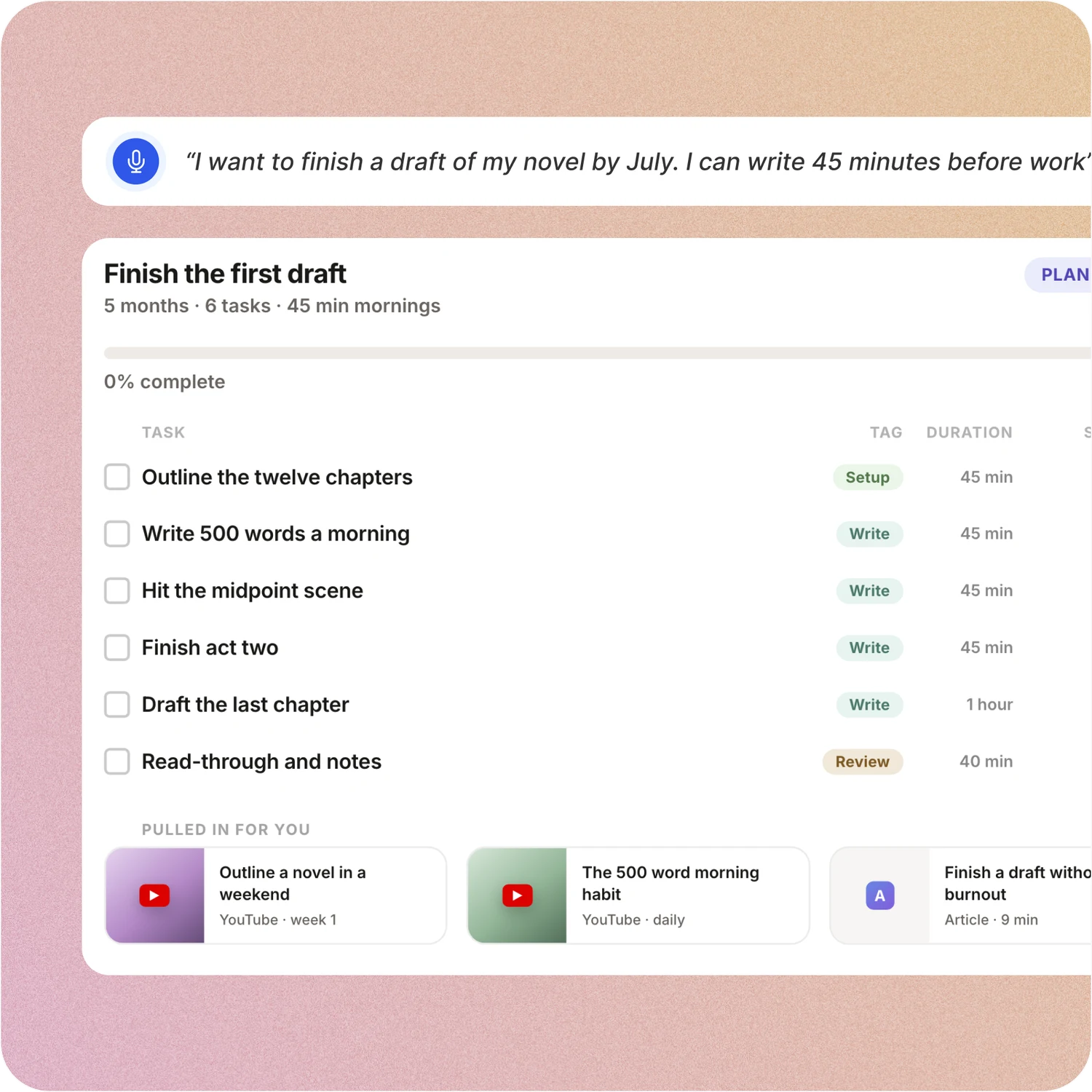
Of the eleven apps we compared, it’s the only one whose AI builds a full plan from a goal, with tasks, subtasks, courses and deadlines, and schedules it on your calendar with a preview you approve. Goal pages then track your progress, and habits with streaks keep the work going.
From each app’s own pricing and help pages, checked November 5, 2026.
The best goal setting apps at a glance
1
ByDesign (best overall): the only app here whose AI builds a full plan from a goal and schedules it with a preview, with goal pages, habits and a year view in the same app; iPhone, iPad, Android, Mac, Windows and web; no free plan (7-day trial), Pro $8 a month, AI plan $15 a month.
2
Griply: a goal-first planner where you set up life areas, goals, subgoals and habits yourself, with progress charts; web, Mac, Windows, iOS and Android; free plan, Premium $49.99 a year ($5.99 monthly) or $149.99 once.
3
Strides: a goal and habit tracker with SMART goals, streaks and progress reports; iPhone, iPad, Mac, Apple Watch and Android; free to download, Strides Plus sold in the app.
4
Goals Wizard: a guided goal-setting program with goals, milestones, habits, routines and a journal, plus ChatGPT-powered goal planning; iPhone, iPad, Apple Watch, Android and web; free to use, Premium sold in the app.
5
Amazing Marvin: a planner with more than 100 features, from goals and habits to time blocking and two-way calendar sync; web, Mac, Windows, iOS and Android; no free plan, $8 a month billed yearly ($12 monthly).
6
Lunatask: tasks, habits, goals, mood tracking, journaling and notes in one end-to-end encrypted app; Mac, Windows, Linux, iOS and Android; free plan, Premium $6 a month billed yearly ($8 monthly).
7
Timestripe: goals laid out on planning views from the day to the year, with Climbs, step-by-step programmes; web, iPhone, iPad, Android and Mac; free plan, $9 a month billed yearly ($19 monthly).
8
ClickUp: a work platform with Goals that track targets, plus tasks, Docs, Gantt views and an AI layer called Brain; web, Mac, Windows, iOS and Android; free plan, Core $9 per user a month billed yearly ($12 monthly).
9
TickTick: tasks, a habit tracker, a Pomodoro timer and calendar views in one app; web, Mac, Windows, iPhone, iPad and Android; free plan, Premium $49.99 a year.
10
Notion: a workspace of pages and databases you shape into any system, with Notion Calendar as a separate app; web, Mac, Windows, iOS and Android; free plan, Plus $10 per seat a month billed yearly ($12 monthly).
11
Habitica: a habit tracker that works like a role-playing game, with gold, gear, Parties, Quests and Challenges; web, iOS and Android; free, with optional subscriptions from $4.99 a month.
How each app helps you reach a goal
Most goal apps here track progress once you’ve set a goal up by hand. ByDesign is the only one whose AI builds the plan from your goal and schedules it with a preview, next to your habits and a view of the whole year.
Prices in US dollars, checked on November 5, 2026. Sources are linked under each app below.
What makes a good goal setting app
It turns a goal into steps
A goal becomes doable when it’s broken into tasks with dates, not left as a wish.
Progress you can see
A page or chart for each goal shows how far you’ve come and what’s next.
Habits that serve the goal
Daily routines are how most goals get done, so they belong next to the goal.
The plan meets your calendar
Steps need a place in your week, around the meetings and plans you already have.
It adapts when life does
Plans slip, so rescheduling should take a moment, not a fresh start.
How we chose these apps
We included the goal setting and goal tracking apps people most often compare with ByDesign: dedicated goal apps, habit trackers with goals, life planners and work tools with a goals feature.
ByDesign is our app, so its section goes into the most detail. Everything about the other apps comes from their own websites, help centres, pricing pages, app store listings and download pages, linked under each app. Prices are in US dollars, can differ by country and change over time; promotions aren’t included.
Features were checked against each app’s own pages from October 23 to 26, 2026, and prices, plans and platforms on November 5, 2026. ByDesign is our app. It’s listed first, and its limits are listed the same way as every other app’s. If anything here is out of date, email info@bydesign.io.
The best goal setting apps in 2026
1. ByDesign
Best overall
Best for: Turning a goal into a plan you follow, with progress you can see.
ByDesign is a goal planner that does the planning for you. Tell it a goal and it asks a few questions, then builds the plan, with tasks, subtasks, courses and deadlines, and schedules it around your calendar, showing every change before it’s saved. Each goal gets a page that tracks progress, habits keep the daily work going, and a year-to-day canvas shows where every goal sits.
Why it’s our pick for reaching goals
It’s the only app on this list whose AI builds a full plan from a goal and schedules it on your calendar with a preview.
Goal pages with tasks, resources and percent complete, which you can share with the people helping you.
Habits with streaks, stats and friends, next to the goals they serve.
Courses, roadmaps and a habit library in the Hub that you can schedule straight onto your calendar.
How ByDesign takes a goal from idea to done
Say the goal, get the plan
Describe a goal, like running a marathon or launching a product. ByDesign asks a few questions, then builds the steps: tasks, subtasks, courses and deadlines. When life changes, replan with one message.
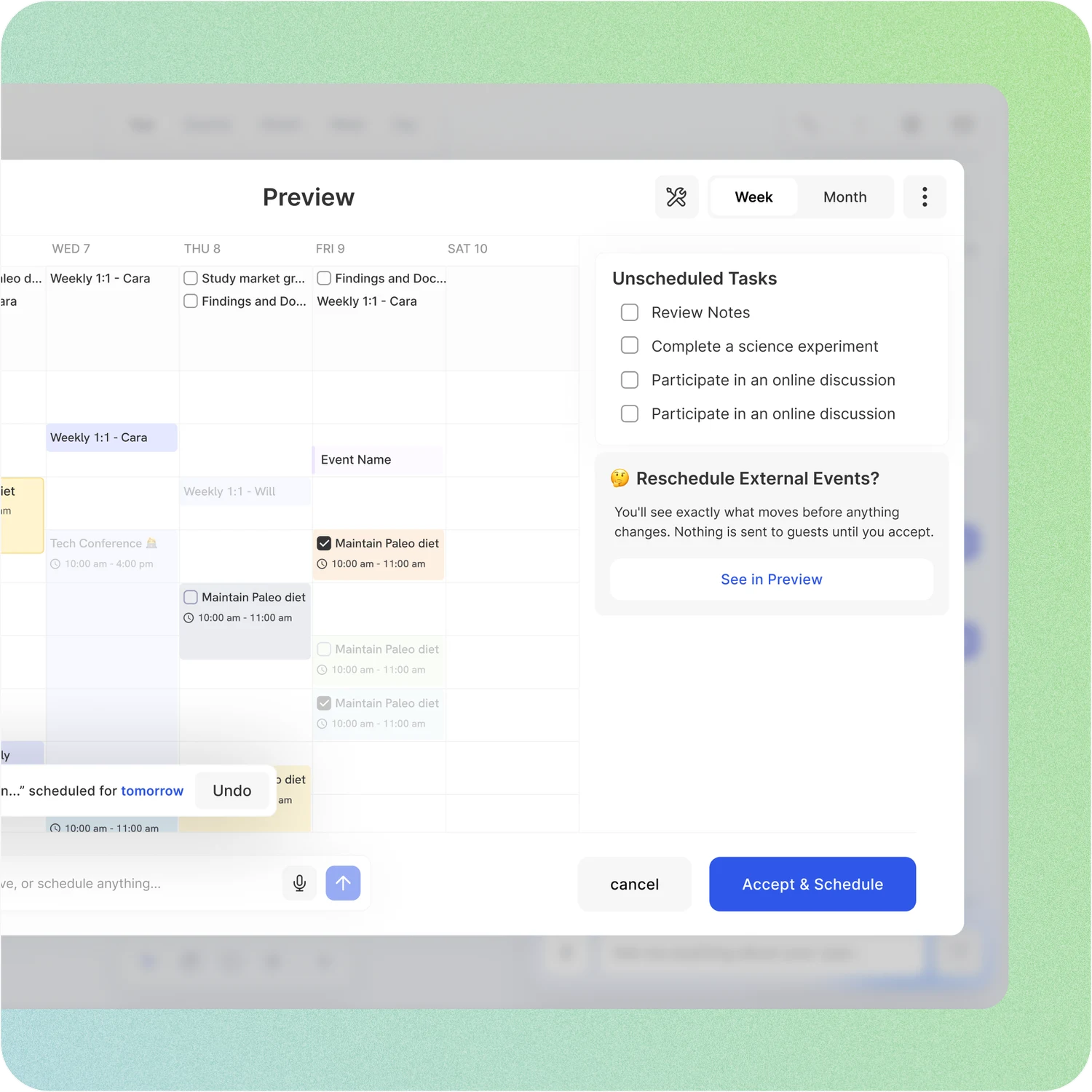
Scheduled around your life, with a preview
On the AI plan, the steps land on your calendar around your work hours, breaks and buffers. Every change and conflict shows first, and you accept it or undo it step by step.
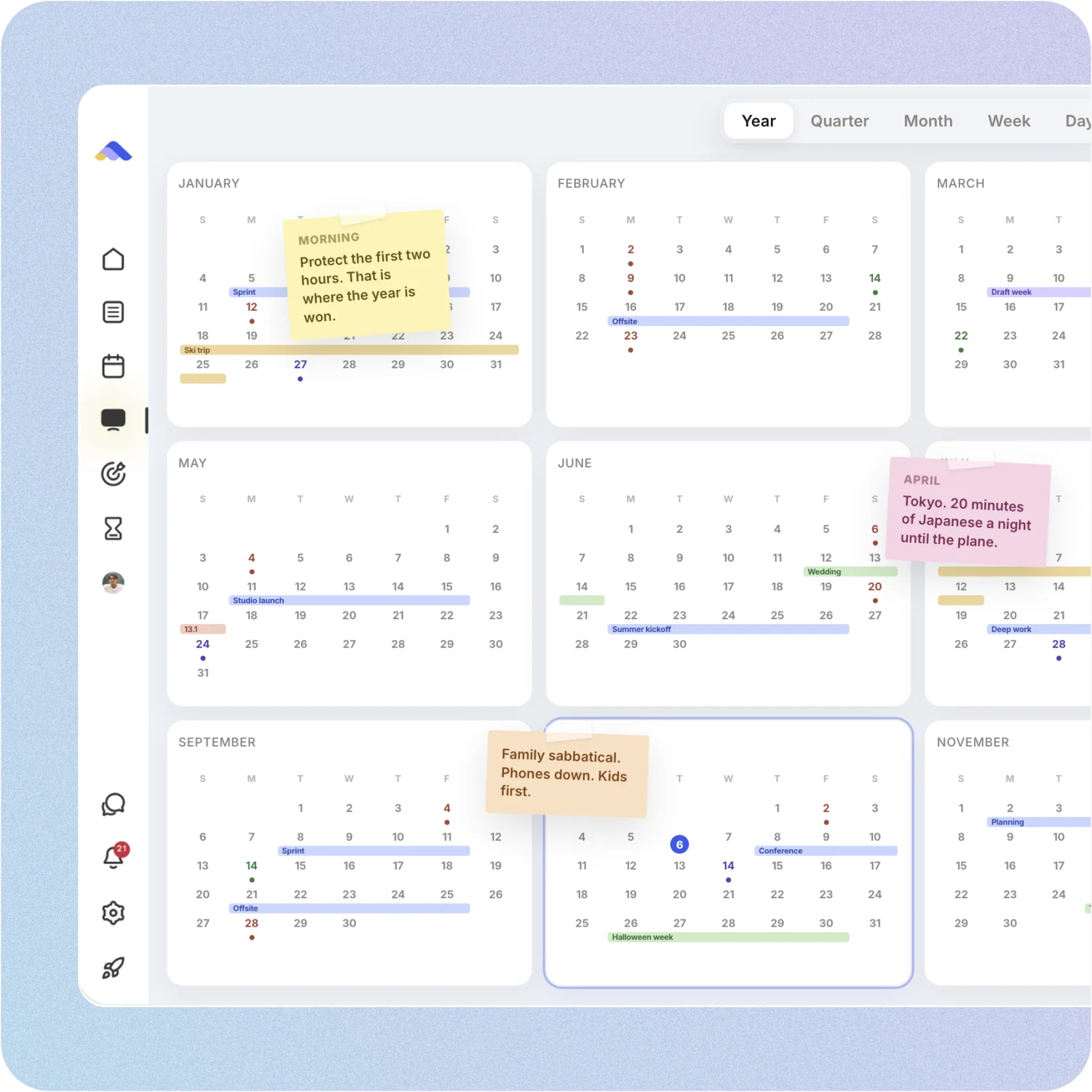
Your year on one canvas
See the year, quarter, month, week and day on one zoomable surface, and pin goals, notes and milestones where they belong. The canvas comes with the AI plan.
A page for every goal
Each goal gets its own page with its tasks and resources and a percent-complete score, and you can share it with the people helping you get there.
Habits that feed your goals
Habits come with streaks, skip days, stats and friends to keep you going, and reminders and deadlines keep the small steps from slipping.
Courses and roadmaps
The Hub has courses, roadmaps and a habit library you can schedule straight onto your calendar, so you never start from a blank page.
An assistant that knows your goals
On the AI plan, the assistant sees your calendar, goals, habits and notes, and moves and reschedules items for you. Talk to it by voice, and it answers in your language.
Reach goals together
Share a goal page, assign tasks and chat with your family, friends or team, in direct or group chats.
ByDesign plans and prices
Pro$8 a month or $69 a yearTasks, habits, pages, calendar sync, the apps on every device and 1,000 MCP requests a month. No AI.
AI$15 a month or $119 a yearEverything in Pro, plus AI goal plans, AI scheduling, the planning canvas and 500 AI credits a month.
AI Plus$20 a month or $199 a yearEverything in AI, plus 1,500 AI credits a month, the best available AI models, a higher-quality voice assistant and more storage.
Every plan starts with a 7-day free trial, no credit card. Paying yearly costs up to 33% less.
What people say
“First off, let me say: ByDesign’s clean, minimal UI is one of the loveliest I’ve used. The overall visual clarity helps me stay focused, and honestly? I find myself oddly fond of it. Also, this might sound funny, but one of the reasons I felt drawn to ByDesign is something you once wrote: that you’re a “productivity app addict.” As someone who’s tried nearly every productivity app under the sun... I felt so seen. That’s when I knew: Okay, this one’s made by someone like me. With love (and a very biased eye) from your fan, Narae 😊💜”
From N
“I just wanna say that I have FINALLY found a to-do list app where I can have recurring tasks and habit/org systems in one place. This is awesome because I keep wondering if one day my autonomous self will break....this is awesome so far!”
From TuneOutlyson003
“Omg I downloaded the app and this is MY DREAM! Is like an easier onenote/word/calendar/notes in ONE🙏”
From adsm1993
Limitations
No free plan: a 7-day free trial, then a paid plan.
The AI features and the year canvas need the AI plan ($15 a month); Pro ($8 a month) has no AI.
Two-way sync is for Google and Apple calendars; Outlook comes in as a subscription.
Platforms
iPhone, iPad, Android, Mac, Windows and web
Calendars
Google and Apple (two-way), Outlook (subscription)
Bottom line: Pick ByDesign if you want a goal turned into a scheduled plan, and your progress tracked in the same app.
Griply is a goal-first planner: you build your vision, life areas, goals, subgoals and tasks yourself, and track habits with streaks. Goals show progress charts, and Premium adds a Gantt timeline of your goals and projects.
Strengths
Life areas, goals and subgoals with progress charts, on a free plan.
Habits with streaks, a Gantt timeline of goals on Premium, and apps on every major platform.
Limitations
No AI: every goal, subgoal and task is set up by hand.
Calendar sync with Google and Outlook only, and no sharing or team plans.
Pricing
Free plan (2 goals, 2 habits). Premium $49.99 a year, or $5.99 monthly; Lifetime $149.99 once.
Platforms
Web, Mac, Windows, iOS and Android
What ByDesign adds: AI that builds and schedules the plan for each goal, Apple Calendar sync, and sharing with family or a team.
Strides tracks goals and habits: set a SMART goal with a target value and date, log your progress and keep streaks going. Reports show progress by week, month or year, and templates help you start.
Strengths
Goals with target values and dates, habits with streaks, and progress reports.
Templates and a free goal-setting video course to get started.
Limitations
No AI, no calendar sync and no web or Windows app.
Sharing and teamwork need Apple devices and iCloud.
Pricing
Free to download; Strides Plus is bought in the app, and Strides doesn’t publish its price on its website.
Platforms
iPhone, iPad, Mac, Apple Watch and Android
What ByDesign adds: goals placed on your calendar with AI planning, and apps for Windows and the web.
Goals Wizard is a guided personal-growth program: you set goals with milestones, build habits and routines, plan each day and journal. Goal plans come from templates, by hand or from its ChatGPT-powered goal planning, and you plan your days and weeks yourself.
Strengths
Goals with milestones and progress, plus habits, routines and a journal.
ChatGPT-powered SMART goals and action plans, and a free version to start.
Limitations
Days and weeks are planned by hand, and two-way calendar sync isn’t among its features.
No Windows app and no year view.
Pricing
Free to download and use; Premium, with unlimited goals, habits and routines, is bought in the app.
Platforms
iPhone, iPad, Apple Watch, Android and web
What ByDesign adds: AI that schedules your goal’s tasks around your calendar with a preview, two-way Google and Apple sync, and a Windows app.
Amazing Marvin packs more than 100 features into one plan, from goals and habits to time blocking, Kanban and a Pomodoro timer. Goals are set up by hand, and it syncs both ways with Google and Apple calendars.
Strengths
Goals, habits, time blocking and two-way Google and Apple sync in one plan.
Over 100 features with no tiers, and a 14-day free trial with no credit card.
Limitations
No AI scheduling and no plan built from a goal; everything is set up by hand.
English only, and no free plan.
Pricing
No free plan; 14-day free trial, no credit card. Marvin Pro $8 a month billed yearly ($96 a year), or $12 monthly.
Platforms
Web, Mac, Windows, iOS and Android
What ByDesign adds: AI that builds and schedules the plan for each goal, and the app in 12 languages.
Lunatask is an all-in-one life tracker: tasks, habits with streaks, goals with progress, a mood tracker, journaling and notes, all end-to-end encrypted. You plan today and tomorrow by dragging tasks onto the calendar.
Strengths
Habits, goals, mood, journaling and notes in one private app.
A free plan, and Premium is $6 a month billed yearly.
Limitations
No AI, and only today and tomorrow to plan, with no week, month or year view.
No web app, and calendars flow in one way only, on Premium.
Pricing
Free plan. Premium $6 a month billed yearly, or $8 monthly.
Platforms
Mac, Windows, Linux, iOS and Android
What ByDesign adds: a view of the whole year, not just today and tomorrow, plus AI planning, a web app and two-way calendar sync.
Timestripe lays your goals out on planning views from the day to the year, so long-term plans sit next to today. Climbs are step-by-step programmes from the community or your own, and goals can carry notes, files and embeds.
Strengths
Planning views from the day to the year, with goals broken into smaller steps.
Climbs and templates to follow, plus shared workspaces.
Limitations
No AI in the app, and calendar sync is one-way to Google and Apple.
No Windows app, and sync between web and mobile isn’t real-time.
Pricing
Free plan. $9 a month billed yearly, or $19 monthly.
Platforms
Web, iPhone, iPad, Android and Mac
What ByDesign adds: AI planning, two-way Google and Apple calendar sync, and a Windows app.
ClickUp is a work platform for teams: Spaces, Lists, Docs, Gantt and Timeline views, Chat and Dashboards. Its Goals feature tracks targets with progress, and Brain, its AI, creates tasks and docs from a description and can time-block priority tasks on your calendar.
Strengths
Goals with targets and progress, inside a full work platform.
A free plan, Google and Outlook calendar sync, and an MCP server.
Limitations
No habit tracker, and Brain creates tasks rather than a plan with courses and deadlines.
Built for team work: Spaces, Lists and custom fields to set up, and plans priced per user.
Pricing
Free plan. Core $9 per user a month billed yearly, or $12 monthly; Business $17 billed yearly, or $25 monthly.
Platforms
Web, Mac, Windows, iOS and Android
What ByDesign adds: a habit tracker, AI that builds a plan from your goal with a preview, and a year-to-day canvas, with no workspace to design.
TickTick is a task manager with a built-in habit tracker, Pomodoro timer and calendar views. Its AI assistant can break a goal into stages, tasks and habits, and it connects to Claude and ChatGPT through an MCP server.
Strengths
Tasks, habits, a focus timer and calendar views in one app.
A free plan, and Premium is $49.99 a year.
Limitations
No goal pages with progress, and no team plan.
Calendar views and the AI features need Premium.
Pricing
Free plan. Premium $49.99 a year.
Platforms
Web, Mac, Windows, iPhone, iPad and Android
What ByDesign adds: goal pages that track progress, a year-to-day canvas, team plans, and AI that schedules a goal onto your calendar with a preview.
Notion is a flexible workspace: you build planners, habit trackers and goal boards yourself from pages, databases and templates. Notion Calendar is a separate app, and Notion AI comes with the Business plan.
Strengths
Pages, databases and a template gallery let you build any system you like.
Strong notes and docs, sharing and an MCP server.
Limitations
Habits, goals and planning have to be built and maintained by you.
No AI scheduling, and the calendar is a separate app.
Pricing
Free plan. Plus $10 per seat a month billed yearly, or $12 monthly. Notion AI comes with Business: $20 billed yearly, or $24 monthly.
Platforms
Web, Mac, Windows, iOS and Android
What ByDesign adds: habits, goal tracking, a calendar and AI scheduling built in, with no system to build or maintain.
Habitica turns your Habits, Dailies and To Do’s into a role-playing game: you earn gold, experience and gear for checking them off, and Parties, Quests and Challenges keep you accountable. Progress shows as levels and streaks rather than a goal page.
Strengths
A game that rewards every habit and task you check off.
Free to use, with Parties and Challenges for accountability.
Limitations
No goal pages or progress over time, and no calendar.
No desktop apps and no AI.
Pricing
Free to use. Optional subscription $4.99 a month or $47.99 a year; Group Plans $9 a month plus $3 per extra member.
Platforms
Web, iOS and Android
What ByDesign adds: goal pages that track progress, AI that turns a goal into scheduled tasks, two-way calendar sync, and apps for Mac and Windows.
ByDesign is our pick for the best goal setting app in 2026. It’s the only app on this list whose AI builds a full plan from a goal, schedules it on your calendar with a preview and tracks it on a goal page, with habits and a year view in the same app.
What is the best free goal setting app?
You can try ByDesign free for 7 days, AI included, with no credit card. Free plans from other apps come with limits, such as 2 goals and 2 habits on Griply’s free plan, and Goals Wizard keeps unlimited goals, habits and routines for Premium.
Is there an app that makes a plan for my goals?
Yes: ByDesign. Tell it a goal and it asks a few questions, then builds the tasks, subtasks, courses and deadlines and schedules them around your calendar, with every change shown first. Goals Wizard’s AI writes an action plan but leaves your days and weeks to you, and Griply, Strides and Amazing Marvin have you set each goal up by hand.
What is the difference between a goal setting app and a habit tracker?
A habit tracker counts the routines you repeat. A goal setting app works toward an outcome with a deadline, broken into steps. ByDesign does both: goal pages track progress, and habits with streaks sit next to the goals they serve.
Which goal app works with Google and Apple Calendar?
ByDesign syncs both ways with Google and Apple calendars, plus Outlook and ICS subscriptions, so your goal’s steps sit next to your meetings. Strides and Habitica have no calendar sync, and Timestripe’s goes one way only.
Can I share a goal with friends or a coach?
With ByDesign, yes: share a goal page with view, comment or edit access, assign tasks, chat in the app and track habits with friends. Griply has no sharing, and Strides’ sharing needs Apple devices and iCloud.
Can AI help me set goals?
Yes. ByDesign’s AI asks a few questions about your goal, then builds the plan and schedules it, and you can replan with one message. You can also plan from ChatGPT or Claude: ByDesign’s MCP server, on every plan, lets them read and update your plan.
Start with one goal
Tell ByDesign what you want to achieve, and see the steps on your calendar before anything is saved. Free for 7 days, no credit card.