

AI goal planner: from a goal to a dated plan
Tell ByDesign what you want to achieve, learn or build. It asks a few questions, then writes a step-by-step plan of dated tasks, with subtasks and links where they help, and puts it on your calendar.
In the AI and AI Plus plans · Updated November 6, 2026.
What is ByDesign’s AI goal planner?
ByDesign’s AI goal planner turns a goal into a plan you can follow. You describe what you want to achieve, learn or build, answer a few questions about timing and your level, and it writes a goal page of 8 to 20 dated tasks, with subtasks and useful links where they help.
The tasks land on your calendar as all-day items between your start date and your deadline, and they sync to Google, Outlook and Apple Calendar. To give them times, use AI scheduling.
Works onByDesign on the web and in the Mac and Windows apps. The iPhone and Android apps don’t have Goals.
How the AI goal planner works
Four steps from an idea to a plan on your calendar.
Step 1: Describe your goal
In Goals, click New Goal and type or say what you want to achieve, learn or build. You can also start from one of the suggestions.
Step 2: Answer a few questions
It asks for a start date, a deadline and how many hours a week you can give it, plus one or two questions about your goal, like your level or budget. Anything your goal already says is filled in for you.
Step 3: Get your plan
Click Build my plan. ByDesign writes a goal page with dated tasks, subtasks where they help and Links & Resources, and puts the tasks on your calendar.
Step 4: Adjust it with AI
Click ✨ Plan with AI on the goal page to regenerate the plan, break down a step, find better resources or adjust the timeline.
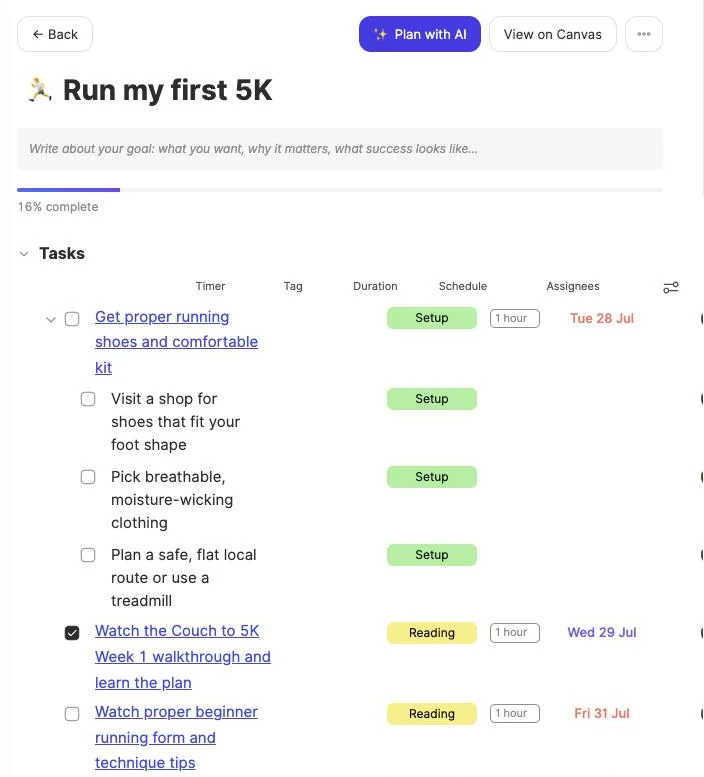
What goes into your plan
Questions written for your goal
Start date, deadline and weekly hours, plus one or two questions that fit the goal, such as your level or budget.
8 to 20 dated tasks
Each task has a date between your start date and deadline, a duration from 15 minutes to 4 hours, and a tag like Reading, Practice or Review.
Subtasks where they help
Bigger steps are broken down into subtasks, and a routine becomes one repeating task.
Links you can use
Some tasks come with a video, a course site or a search, checked before they’re saved, and the goal gets 3 to 6 links under Links & Resources.
On your calendar
The tasks land on your calendar as all-day items and sync to Google, Outlook and Apple Calendar.
Replan in one go
Regenerate the plan when things change. It asks you to confirm first and keeps the tasks you’ve completed.
Change it by chat
Ask the assistant to shift dates, cap your hours per week, reschedule missed tasks, or add tasks and links.
Type it or say it
The goal box has a mic, so you can describe your goal out loud.
Goals to try
Type any of these into New Goal, or describe your own.
- Try“Run my first 10K by June”
- Try“Learn conversational Spanish this year”
- Try“Launch my portfolio website in six weeks”
- Try“Read 12 books this year”
- Try“Pass my driving test in three months”
- Try“Get comfortable with Python for data analysis”
Good to know
- A plan is saved as soon as it’s built; there’s no preview step. Regenerating a plan asks you to confirm first.
- Tasks get dates, not times. Use AI scheduling to fit them into your day.
- Subtasks stay on the goal page. Only the main tasks go on your calendar.
- Routines become repeating tasks, not habits.
- Building a plan uses AI credits: the New Goal window shows the estimate, about 45 credits, and you need at least 25 to start.
- Keep the goal page open while a new plan is being written.
Which plan includes it?
AI goal planner comes with the AI ($15 a month or $119 a year) and AI Plus ($20 a month or $199 a year) plans. Pro doesn’t include it. The 7-day free trial doesn’t include AI goal plans.
More ByDesign features
- AI scheduling
- Habit tracker
- Year planner
- Time blocking
- Calendar sync
- Reminders
- Quick capture
- Task views
- Widgets
- Dark mode
- See every feature →
Use ByDesign with your AI assistantUse ByDesign with ChatGPTUse ByDesign with ClaudeUse ByDesign with Gemini
AI goal planner questions
What is ByDesign’s AI goal planner?
It turns a goal into a plan. Describe what you want to achieve, learn or build, answer a few questions, and ByDesign writes 8 to 20 dated tasks, with subtasks and links where they help, and puts them on your calendar.
What questions does it ask?
A start date, a deadline and how many hours a week you can give it, from 1 to 20, plus one or two questions that fit your goal, such as your level, fitness baseline or budget. Anything your goal already says is filled in.
Does the plan go on my calendar?
Yes. Each task gets a date between your start date and deadline and appears on your calendar as an all-day item, synced to Google, Outlook and Apple Calendar. Subtasks stay on the goal page.
Can I change the plan later?
Yes. Click ✨ Plan with AI on the goal page to regenerate the plan, break down a step, find better resources or adjust the timeline. Regenerating asks you to confirm and keeps completed tasks.
Does it include links and resources?
Yes. Some tasks come with a video, a course site or a search, checked before they’re saved, and the goal has 3 to 6 links under Links & Resources.
Can I use it on my phone?
Goals are in ByDesign on the web and in the Mac and Windows apps. The iPhone and Android apps don’t have them.
Which plan includes the AI goal planner?
The AI goal planner comes with the AI ($15 a month or $119 a year) and AI Plus ($20 a month or $199 a year) plans. Pro doesn’t include it. The 7-day free trial doesn’t include AI goal plans.
Turn your next goal into a plan
Goal plans come with the AI and AI Plus plans. Tasks, calendar, habits and notes are all in one app.
Try ByDesign free