

A habit tracker that lives in your planner
Build routines next to your tasks and calendar. Choose how often a habit repeats, check it off each day and watch your streak grow, with reminders and home-screen widgets to keep you going.
In every plan, from Pro · Updated November 6, 2026.
What is ByDesign’s habit tracker?
ByDesign’s habit tracker keeps your routines in the same place as your tasks and calendar. You choose how often a habit repeats and check it off each day, and ByDesign counts your streak, your completions and the days you missed.
Habits show up on your dashboard, in every calendar view and in the Today’s Tasks widget on iPhone and Android, so you can tick them off without opening the app.
Works onByDesign on the web, iPhone, iPad and Android, and in the Mac and Windows apps.
How the habit tracker works
Set it up once, then check it off as you go.
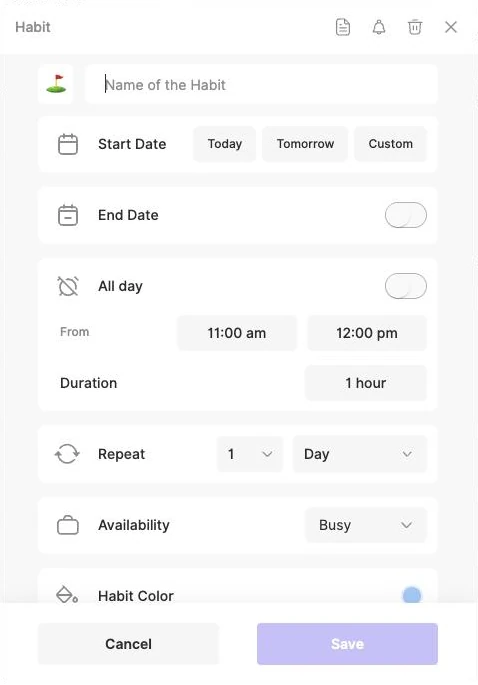
Step 1: Create a habit
Choose Habit when you add something, or press + on the Habits section of your dashboard. Give it a name and an emoji.
Step 2: Set how often it repeats
Every day or every few days, on chosen weekdays, or on a day of the month, like the 1st or the last Friday. Add a time and a duration, or keep it all day.
Step 3: Check it off
Tick it on your dashboard, in the calendar or from the Today’s Tasks widget. The 🔥 beside it shows your current streak.
Step 4: Watch your progress
Open Habit progress to see your current and best streak, completions, missed days, and weekly, monthly and yearly totals.
What you can do with habits
Flexible repeats
Every day or every few days, on chosen weekdays, on a day of the month like the 15th or the last Friday, or once a year.
Streaks that count
Your streak grows with every scheduled day you complete. Miss a day and it starts again.
Skip without breaking it
Skip a day when you need to, without affecting your streak.
Progress at a glance
Current streak, best streak, completions and missed days, with weekly, monthly and yearly totals.
Reminders
Get a push reminder before a habit’s set time, on your phone or on the web.
On your calendar
Give a habit a time and a duration, see it in every calendar view, and push it to Google, Outlook or Apple Calendar.
Home-screen widgets
The Today’s Tasks widget on iPhone and Android lists today’s habits first and lets you check them off.
Build with friends
Invite friends to build a habit with you. Each gets their own copy, with comments and a streak board.
Good to know
- Habits repeat on a schedule: every few days, weeks, months or years, or on set weekdays. There’s no option for a number of times per week on any days.
- Each day is done or not done. Habits don’t count amounts, like glasses of water.
- Skipping a day keeps your streak. A day you miss resets it.
- Reminders are for habits with a set time. On the web, all-day habits don’t have reminders; the phone apps allow them.
- All-day habits go to your connected calendar only when the All-day habits created in ByDesign setting is on.
- On the AI and AI Plus plans, ByDesign’s assistant can create habits, check them off, skip a day or delete one for you. AI scheduling leaves your habits where they are unless you name one.
Which plan includes it?
Habit tracker comes with every plan: Pro ($8 a month or $69 a year), AI ($15 a month or $119 a year) and AI Plus ($20 a month or $199 a year). Free for 7 days, no credit card, no commitment.
More ByDesign features
- AI scheduling
- AI goal planner
- Year planner
- Time blocking
- Calendar sync
- Reminders
- Quick capture
- Task views
- Widgets
- Dark mode
- See every feature →
Use ByDesign with your AI assistantUse ByDesign with ChatGPTUse ByDesign with ClaudeUse ByDesign with Gemini
Habit tracker questions
Does ByDesign have a habit tracker?
Yes. Habits sit next to your tasks and calendar. Set how often each one repeats and check it off each day, and ByDesign tracks your streak, completions and missed days. It comes with every plan.
Can I skip a day without losing my streak?
Yes. Use Skip Habit for that day and your streak stays. A day you simply miss resets it.
Can a habit repeat on certain days?
Yes. Repeat it every day or every few days, on chosen weekdays, on a day of the month such as the 1st or the last Friday, or yearly. There’s no option for a number of times per week on any days.
Do habits show in Google Calendar?
They can. Push a habit to a connected Google, Outlook or Apple calendar, and skipping a day updates it there too. All-day habits need the All-day habits created in ByDesign setting turned on.
Can I check off habits from my phone’s home screen?
Yes. The Today’s Tasks widget on iPhone and Android lists today’s habits first, and you can check them off from it.
Can I build a habit with friends?
Yes. Invite friends to build it with you. Each friend gets their own copy, and you can comment and follow everyone’s progress on a streak board.
Which plan includes the habit tracker?
The habit tracker comes with every plan: Pro ($8 a month or $69 a year), AI ($15 a month or $119 a year) and AI Plus ($20 a month or $199 a year). Free for 7 days, no credit card, no commitment.
Start building your habits
Tasks, calendar, habits and notes in one app, with AI planning built in. Free for 7 days, no credit card.
Try ByDesign free