

Widgets: your day on your home screen
Put today’s tasks and habits, your calendar, your Inbox or any page on your iPhone or Android home screen, and check things off without opening the app.
In every plan, from Pro · Updated November 6, 2026.
What are ByDesign’s widgets?
ByDesign’s widgets put your day on your phone’s home screen. Today’s Tasks lists today’s tasks with your habits first, the calendar widgets show this month and today’s events, the Inbox widget has Quick Add, and Pin a Page shows any page you choose.
You can check tasks off right on the widget, and the widgets refresh when you add, finish or change something.
Works oniPhone, iPad and Android home screens, with the ByDesign app installed.
How to add a widget
The same few steps on iPhone and Android.
Step 1: Open the widget gallery
Touch and hold an empty part of your home screen, then open the widget gallery.
Step 2: Find ByDesign
Search for ByDesign and pick a widget: Today’s Tasks, a calendar, your Inbox or a pinned page.
Step 3: Choose a size
Pick small, medium or large where the widget offers it, then add it. Android widgets can be resized.
Step 4: Check things off
Tick tasks and habits on the widget, or tap to open them in ByDesign.
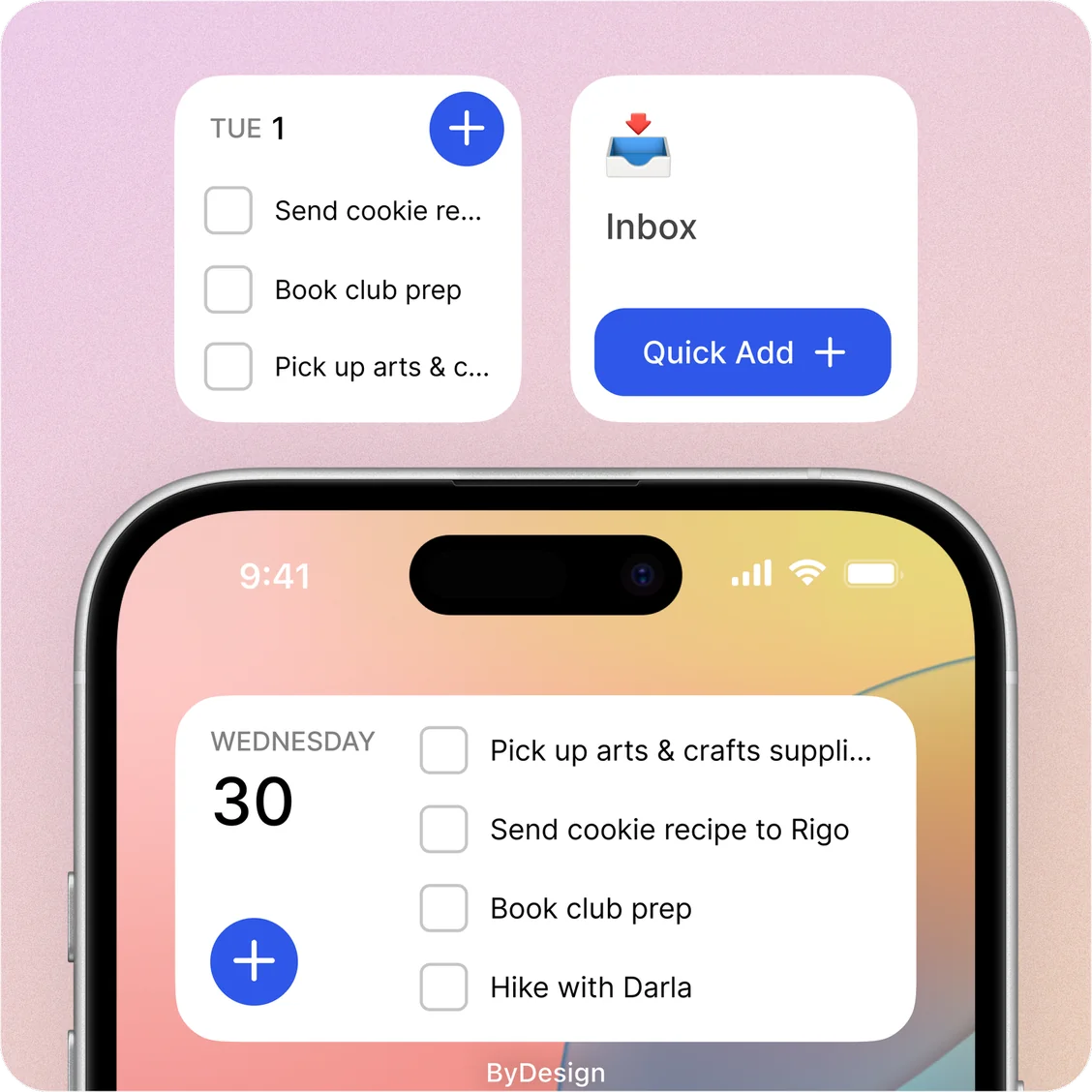
The ByDesign widgets
Today’s Tasks
Today’s tasks with your habits first. Check them off from the widget.
Calendar Events
This month at a glance, plus today’s events from Google, Apple and Outlook calendars on the bigger size.
Calendar with tasks
Today’s tasks and events together, and you can complete tasks right from the widget.
Inbox with Quick Add
See your Inbox, complete or expand tasks, and add new ones with Quick Add.
Pin a Page
Pick any page and see its tasks on your home screen. Complete or expand them, and on iPhone add new ones.
Sizes that fit
Small, medium and large on iPhone, and resizable on Android.
Always up to date
Widgets refresh when you add, finish or change items, and regularly in the background.
Light and dark
iPhone widgets follow your light or dark appearance, and the Android calendar, Inbox and page widgets have dark versions.
Good to know
- Widgets show today’s items, not the days ahead.
- Today’s Tasks shows your habits; the calendar widgets show tasks and events but not habits.
- Some iPhone widgets need a recent version of iOS. Today’s Tasks works from iOS 17.
- iPhone widgets are for the home screen; there are no Lock Screen widgets.
- On Android, two calendar widgets share the name What’s next with month view: one shows events, the other events and tasks.
Which plan includes it?
Widgets comes with every plan: Pro ($8 a month or $69 a year), AI ($15 a month or $119 a year) and AI Plus ($20 a month or $199 a year). Free for 7 days, no credit card, no commitment.
More ByDesign features
- AI scheduling
- AI goal planner
- Habit tracker
- Year planner
- Time blocking
- Calendar sync
- Reminders
- Quick capture
- Task views
- Dark mode
- See every feature →
Use ByDesign with your AI assistantUse ByDesign with ChatGPTUse ByDesign with ClaudeUse ByDesign with Gemini
Widget questions
Does ByDesign have widgets?
Yes, on iPhone, iPad and Android: Today’s Tasks, calendar widgets, your Inbox with Quick Add, and Pin a Page.
Can I check off tasks from a widget?
Yes. Today’s Tasks, the calendar widget with tasks, Inbox and Pin a Page let you complete tasks without opening the app.
Do widgets show habits?
Today’s Tasks lists today’s habits first, and you can check them off there. The calendar widgets show tasks and events only.
Can I add a task from a widget?
Yes. The Inbox widget has Quick Add, and on iPhone the Pin a Page widget lets you add tasks to that page.
Do widgets update on their own?
Yes. They refresh when you add, complete or change items, and regularly in the background.
Which plan includes widgets?
Widgets comes with every plan: Pro ($8 a month or $69 a year), AI ($15 a month or $119 a year) and AI Plus ($20 a month or $199 a year). Free for 7 days, no credit card, no commitment.
Put your day on your home screen
Tasks, calendar, habits and notes in one app, with AI planning built in. Free for 7 days, no credit card.
Try ByDesign free