

Who it’s for
ByDesign is for individuals and small teams who want their plans in one calm place, especially people who love simplicity or live with ADHD. It isn’t trying to be everything: the tools you need are there without clutter or confusing menus, so you can start with a simple to-do list and add more when you’re ready.
People use it to run their day, juggle work and personal life, study, build habits, and move towards bigger goals, on their own or with the people they work with.
Everything in one place
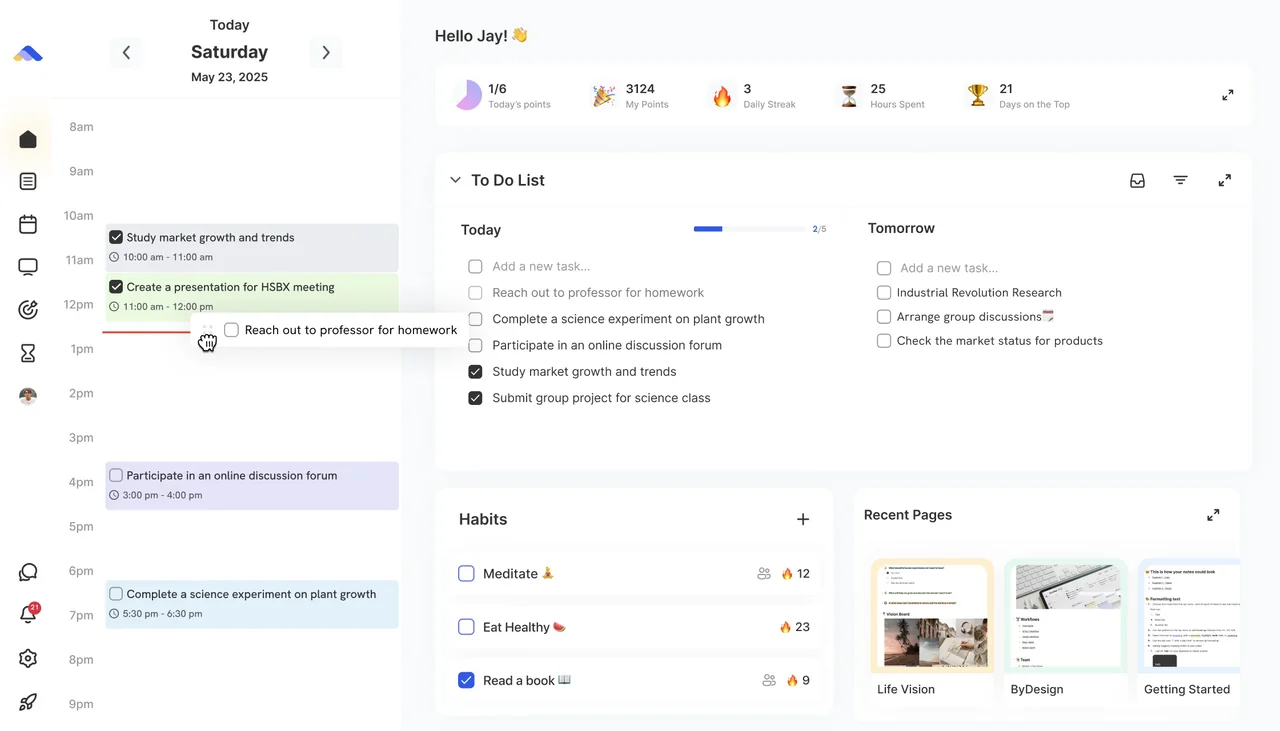
- Plan today from the Dashboard: today’s calendar beside your tasks for today, anything overdue and tomorrow, your habits and the widgets you choose.
- Keep tasks and notes together in pages and folders, with an Inbox for anything you haven’t sorted yet.
- Add a task in one line with Quick Add, using words like on, at and every to set its date, time and repeat.
- Plan your time on a calendar that syncs with Google, Apple and Outlook, and drag tasks onto it to block out your day.
- See your tasks by day, by week, someday or on a Kanban board.
- Build habits and track your streaks, with reminders for tasks, events and habits.
- Focus with the built-in Pomodoro Timer.
- See your whole year on the AI Canvas and zoom into a single day.
- Turn a goal into a plan of dated tasks, and let AI scheduling draft your week (AI and AI Plus plans).
- Use ByDesign from ChatGPT, Claude or Gemini through MCP.
AI that plans with you
On the AI and AI Plus plans, ByDesign’s assistant helps you plan. You ask in plain words, by typing or by voice, and you stay in charge of what changes.
- AI scheduling drafts your day, week or month on a preview of your calendar, around your working hours and the events you already have. Nothing changes until you click Accept & Schedule.
- The AI goal planner turns a goal into a plan of 8 to 20 dated tasks, with subtasks and links, and puts the tasks on your calendar.
- The AI Canvas shows your plans from the whole year down to a single day, with the assistant beside them.
AI requests use credits from your plan’s monthly allowance: 500 on AI and 1,500 on AI Plus. If you’d rather plan without AI, turn off the AI Feature setting and AI Canvas and My Goals are hidden.
Private by default, easy to share
Your pages and tasks are private to you until you choose to share them, and your profile is private by default too. Your data is encrypted in transit. When you want to work with others, Share on any page gives you the options:
- Invite people by email, and choose whether each one can view, comment or edit.
- Let anyone with the link view, comment or edit, without adding people one by one.
- Publish the page to the web as a read-only page anyone can open, and unpublish it at any time.
On shared pages you can comment on the whole page or highlight text to comment on it, and you can chat with your connections in ByDesign.
Works with ChatGPT, Claude and Gemini
ByDesign has its own MCP server, so you can connect your workspace to ChatGPT, Claude or Gemini and ask about your schedule, create tasks, reschedule your week or pull up a note from there. MCP comes with every plan, including Pro.
Where it works
- Web: open app.bydesign.io in any browser.
- iPhone and iPad: get ByDesign from the App Store.
- Android: get ByDesign from Google Play.
- Mac and Windows: download the desktop app from the Download page on bydesign.io.
Sign up with Apple, Google, Microsoft or your email, and your plans stay in sync on every device. AI goal plans, the AI Canvas and the schedule preview are on the web and in the Mac and Windows apps; the iPhone and Android apps cover your day, your tasks, your calendar and your habits on the go, and their assistant can schedule tasks for you too.
Plans and the free trial
Every plan starts with a 7-day free trial, with no credit card and no commitment. After that, you choose a plan:
- Pro: $8 a month, or $69 a year. Tasks, habits, pages, Kanban, the Pomodoro Timer, calendar sync, the apps on every device and MCP.
- AI: $15 a month, or $119 a year. Everything in Pro, plus AI goal plans, AI scheduling, the planning canvas, the AI assistant and 500 AI credits a month.
- AI Plus: $20 a month, or $199 a year. Everything in AI, with 1,500 AI credits a month.
Who makes ByDesign
ByDesign is made by WHITEBOARD Limited Liability Company, founded in 2021 at Dartmouth College. It went through the Techstars accelerator.
Good to know
- AI credits reset every month. Dragging things yourself, undoing and cancelling a preview don’t use any.
- The 7-day free trial doesn’t include AI goal plans.
- Tasks, habits, pages, calendar sync and the apps on every device come with every plan, Pro included.